|
Size: 831
Comment:
|
Size: 2275
Comment: renamed so doesn't conflict with xml auto updating
|
| Deletions are marked like this. | Additions are marked like this. |
| Line 1: | Line 1: |
| ## page was renamed from mri_deface | |
| Line 4: | Line 5: |
| See also [[http://www.na-mic.org/Wiki/index.php/Mbirn:_Defacer_for_structural_MRI|MBIRN page]] Cite this paper is using mri_deface: [[http://www.ncbi.nlm.nih.gov/pmc/articles/PMC2408762/|A Technique for the Deidentification of Structural Brain MR Images]] |
|
| Line 5: | Line 10: |
| Line 10: | Line 16: |
| Example: | * [[https://surfer.nmr.mgh.harvard.edu/pub/dist/mri_deface/sample_T1_input.mgz|sample_T1_input.mgz]] - This is a sample input volume used in the example. Replace with your own input. Use gunzip to decompress these downloads, ie.: |
| Line 12: | Line 21: |
| mri_deface orig.mgz talairach_mixed_with_skull.gca face.gca orig_defaced.mgz | gunzip mri_deface-v1.22-Linux64.gz cp mri_deface-v1.22-Linux64.gz mri_deface chmod a+x mri_deface gunzip talairach_mixed_with_skull.gca.gz gunzip face.gca.gz |
| Line 14: | Line 27: |
| Then, example usage, using the example input volume: {{{ ./mri_deface sample_T1_input.mgz talairach_mixed_with_skull.gca face.gca sample_T1_input_defaced.mgz }}} For your own data, substitute the name of your T1-weighted input file, which can be a dicom or nifti: {{{ ./mri_deface my_T1.nii talairach_mixed_with_skull.gca face.gca my_T1_defaced.nii }}} You will need a volume viewer to view the resulting defaced file. The freesurfer package includes the 'freeview' viewer, but there are many others capable of reading dicom and nifti volumes. [[http://www.mccauslandcenter.sc.edu/mricro/mricron/|MRIcron]] is a good option (use MRIcron, not MRIcro, because you will want nifti support). Sample input before and after defacing: {{attachment:sample_T1_input.jpg}} {{attachment:sample_T1_input_defaced.jpg}} |
Automated Defacing Tools
See also MBIRN page
Cite this paper is using mri_deface: A Technique for the Deidentification of Structural Brain MR Images
Note: A license file is no longer necessary to use these tools:
sample_T1_input.mgz - This is a sample input volume used in the example. Replace with your own input.
Use gunzip to decompress these downloads, ie.:
gunzip mri_deface-v1.22-Linux64.gz
cp mri_deface-v1.22-Linux64.gz mri_deface
chmod a+x mri_deface
gunzip talairach_mixed_with_skull.gca.gz
gunzip face.gca.gz
Then, example usage, using the example input volume:
./mri_deface sample_T1_input.mgz talairach_mixed_with_skull.gca face.gca sample_T1_input_defaced.mgz
For your own data, substitute the name of your T1-weighted input file, which can be a dicom or nifti:
./mri_deface my_T1.nii talairach_mixed_with_skull.gca face.gca my_T1_defaced.nii
You will need a volume viewer to view the resulting defaced file. The freesurfer package includes the 'freeview' viewer, but there are many others capable of reading dicom and nifti volumes. MRIcron is a good option (use MRIcron, not MRIcro, because you will want nifti support).
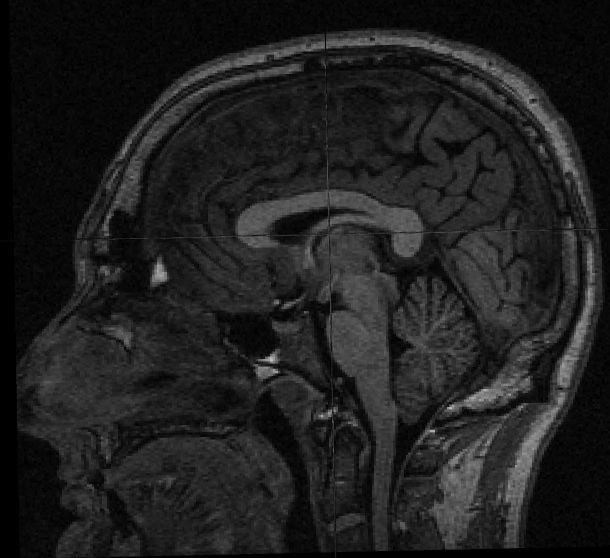
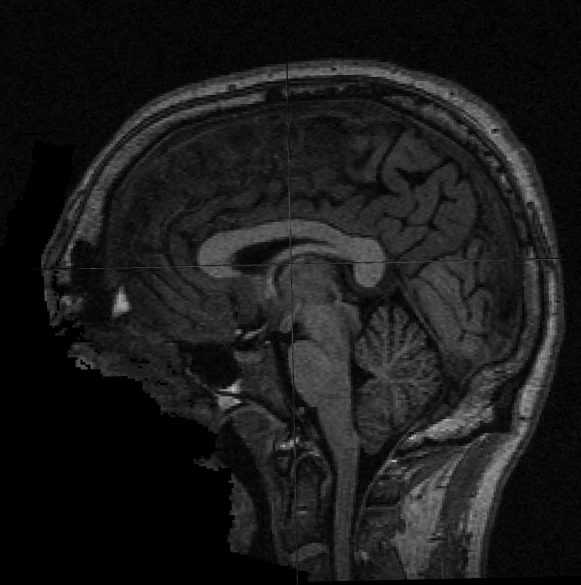
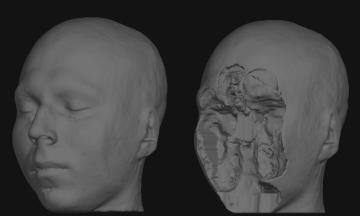
Sample input before and after defacing: