
|
Size: 749
Comment:
|
Size: 1677
Comment:
|
| Deletions are marked like this. | Additions are marked like this. |
| Line 1: | Line 1: |
| ||Up to FreeviewGuide||Back to [[../FreeviewQuickStart|FreeviewQuickStart]]||Continue to [[/FreeviewGeneralUsage/FreeviewViewingArea|FreeviewViewingArea]]|| | ||Up to FreeviewGuide||Back to [[FreeviewGuide/FreeviewGeneralUsage/FreeviewQuickStart|FreeviewQuickStart]]||Continue to [[/FreeviewGeneralUsage/FreeviewViewingArea|FreeviewViewingArea]]|| |
| Line 9: | Line 9: |
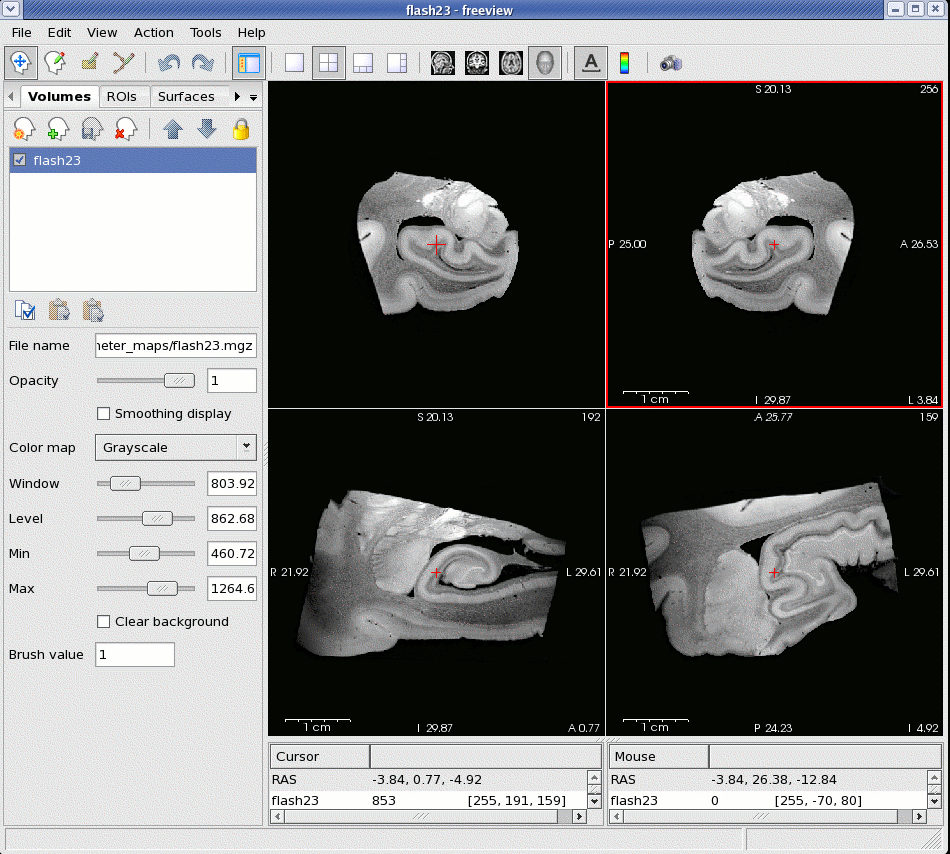
| {{attachment:fvscreenshot.gif}} |
|
| Line 10: | Line 12: |
{{attachment:toolbar.gif}} || {{attachment:NavigatorIcon.gif}} || Navigate Tool || {{attachment:VoxelEditIcon.gif}} || Voxel Edit Tool || || {{attachment:ControlPanelIcon.gif}} || Control Panel On/Off Button || {{attachment:1x1icon.gif}} || 1x1 Screen View || || {{attachment:2x2icon.gif}} || 2x2 Screen View || {{attachment:1x3icon.gif}} || 1x3 Screen View || || {{attachment:1x3horizicon.gif}} || 1x3 Horizontal Screen View || {{attachment:saggital.gif}} || Saggital Volume View || || {{attachment:coronal.gif}} || Coronal Volume View || {{attachment:axial.gif}} || Axial Volume View || || {{attachment:3D.gif}} || 3D Volume View || {{attachment:A.gif}} || Show Coordinate Annotation || || {{attachment:colorbar.gif}} || Show Color Scale Bar || {{attachment:screenshticon.gif}} || Screenshot || |
|
| Line 13: | Line 25: |
| *Volumes *Grayscale *Heat *Jet *Lookup Table *ROIs *Surfaces *Way Points |
=== Volumes === ==== Grayscale ==== ==== Heat ==== ==== Jet ==== ==== Lookup Table ==== === ROIs === === Surfaces === === Way Points === |
Up to FreeviewGuide |
Back to FreeviewQuickStart |
Continue to FreeviewViewingArea |
Interface
Freeview consists of one window. In this window there is the main viewing area, to the left is the control panel, at the top is the toolbar, at the bottom are the cursor and mouse coordinates, and if you are in the "Voxel Edit" mode, there will be a floating "Drawing" toolbox.
Display Window
Toolbar

|
Navigate Tool |
|
Voxel Edit Tool |
|
Control Panel On/Off Button |
|
1x1 Screen View |
|
2x2 Screen View |
|
1x3 Screen View |
|
1x3 Horizontal Screen View |
|
Saggital Volume View |
|
Coronal Volume View |
|
Axial Volume View |
|
3D Volume View |
|
Show Coordinate Annotation |
|
Show Color Scale Bar |
|
Screenshot |


Control Panel
Volumes
Grayscale
Heat
Jet
Lookup Table
ROIs
Surfaces
Way Points
Drawing Toolbox
Continue to FreeviewViewingArea for more information |