
|
Size: 15335
Comment:
|
Size: 18753
Comment:
|
| Deletions are marked like this. | Additions are marked like this. |
| Line 1: | Line 1: |
| [[FsTutorial|top]] | [[FsTutorial|previous]] '''<<TableOfContents>>''' |
|
| Line 4: | Line 8: |
| Make sure you have set you SUBJECTS_DIR to correct location. == Relationship between segmentation, parcellation, and LookUp Table (LUT) == Open your subjectID in tkmedit using the following command ---- {{{ tkmedit <subjectID> orig.mgz -aux aparc+aseg.mgz \ |
Make sure you have set your SUBJECTS_DIR to correct location as ---- {{{ setenv SUBJECTS_DIR $TUTORIAL_DATA/buckner_data/tutorial_subjs/group_analysis_tutorial cd $SUBJECTS_DIR }}} ---- == Relationship between segmentation, parcellation and LookUp Table (LUT) == In this exercise, you will examine a segmentation, parcellation, and color lookup table to understand how they are related. Open the subject in tkmedit using the following command: ---- {{{ tkmedit 004 orig.mgz -aux aparc+aseg.mgz \ |
| Line 18: | Line 30: |
| tksurfer <subjectID> lh inflated -annot aparc.annot }}} ---- Run the following command to display the contents of LUT |
tksurfer 004 lh inflated -annot aparc.annot }}} ---- Finally, run the following command to display the contents of LUT (in ''another'' new terminal window) |
| Line 27: | Line 39: |
| Click on a point on the image loaded in tkmedit. You can see the structure name in the tkmedit toolbar. Look at the Aux value, find value in LUT, which you have opened using the command mentioned above. See that it is the same structure as listedin tkmedit. Click on a point in tksurfer and see structure name. Note that the name does not have lh or rh in it. Click on the Save Point tool button, and then click on Goto Point tool button in tkmedit. You will notice that the structure name in tkmedit has lh or rh in it. |
You can hit the 'Page Up' and 'Page Down' buttons to see the rest of the file. Or click [[FsTutorial/AnatomicalROI/FreeSurferColorLUT|here]] to view the contents of the file. Things to do -- Navigating between tkmedit and LUT: 1. Click on a point on the image loaded in tkmedit. 1. See the structure name in the tkmedit Tools window (under the Cursor section). 1. Look at the Aux (aparc+aseg.mgz) value in the tkmedit Tools window. For example, it may say 1024. 1. Find that value in the LUT, which you have opened using the command mentioned above. 1. Verify that it is the same structure as listed in tkmedit. Things to do -- Navigating between tksurfer, tkmedit and LUT: 1. Click on a point in tksurfer in the superior temporal gyrus. If you don't know it's location, you can hover over the different areas to see their label underneath the Mouse section of the Tools window. 1. Note that the name displayed in the tksurfer Tools window does not have lh or rh in it. This is because you loaded only one hemisphere. 1. In tksurfer, click on the Save Point button {{attachment:icon_cursor_save.gif}} 1. In tkmedit, click on Goto Point button {{attachment:icon_cursor_goto.gif}} , which takes the cursor to the ROI. Zoom in to see the cursor. 1. Verify the structure name in the tkmedit Tools window. Note that it DOES have an lh or rh in it. 1. The Aux (aparc+aseg.mgz) value should be 1030. 1. In FreeSurferColorLUT.txt, verify that 1030 is ctx-lh-superiortemporal You can close tkmedit and tksurfer once you are done. To get out of the less command, type 'q' for quit. |
| Line 35: | Line 63: |
| To load an existing label, for example lh.cortex.label, run ---- {{{ less <subjectID>/label/lh.cortex.label }}} ---- To load a label in tkmedit, first load the subject you want to work on, in tkmedit. ---- {{{ tkmedit <subjectID> orig.mgz }}} ---- Then on the tkmedit toolbar, go to '''File-> Label --> Load Label --> lh.cortex.label''' To load the label in tksurfer, make sure you load the subject in tksurfer. ---- {{{ tksurfer subject lh inflated }}} ---- On the tksurfer toolbar, go to '''File --> Label --> Load Label --> lh.cortex.label''' You can also load the label from the tksurfer tool bar using Ctrl - right mouse button on the 'Show labels' tool button. Browse the label you want to load and click 'OK' |
To map a label, such as the lh.BA45.label, from the fsaverage subject to a target subject, run {{{ cd $SUBJECTS_DIR mri_label2label \ --srcsubject fsaverage \ --srclabel fsaverage/label/lh.BA45.label \ --trgsubject 004 \ --trglabel 004/label/lh.BA45.label \ --hemi lh \ --regmethod surface }}} And then to look at the contents of that newly created label file, run ---- {{{ less 004/label/lh.BA45.label }}} ---- To load the label in tkmedit, first load the subject you want to work on, in tkmedit. ---- {{{ tkmedit 004 orig.mgz }}} ---- Then on the menu bar at the top of tkmedit tools window, go to '''File --> Label --> Load Label --> Browse --> lh.BA45.label''' and hit 'OK' in both windows. The label is visible in coronal slice 153. {{attachment:BAlabel.jpg}} This label can be edited when the Select Voxels button is chosen. Use the middle mouse button to add to the label. Use the right mouse button to delete from the label. If this was your own subject, you would want to make sure you save your edits by going to '''File --> Label --> Save Label''' but it's not necessary for this tutorial. To load the label in tksurfer, first load the subject (in another terminal window). ---- {{{ tksurfer 004 lh inflated }}} ---- On the menu bar at the top of tksurfer tools window, go to '''File --> Label --> Load Label --> Browse --> lh.BA45.label''' {{attachment:BAlabel_tksurfer.jpg}} Information on how to create and edit labels in tksurfer can be found on [[https://surfer.nmr.mgh.harvard.edu/fswiki/tksurfer_labeledit|this wiki]]. You don't have to do this for the tutorial, but please feel free to take a look if you are interested. |
| Line 59: | Line 106: |
| During the normal FreeSurfer processing stream, via the recon-all script, [[http://surfer.nmr.mgh.harvard.edu/fswiki/FsTutorial|(a freesurfer tutorial is available.)]] some statistical output files are generated. They are kept in each subjects {{{stats/}}} subdirectory, and are a result of the subcortical segmentation, aseg, and the cortical parcellation, aparc. These tables include information on each labeled region for the individual subject. ---- {{{ cd $SUBJECTS_DIR/subject/stats |
During the normal FreeSurfer processing stream, via the recon-all script some statistical output files are generated. They are kept in each subjects' {{{stats/}}} subdirectory and are generated for the subcortical segmentation (aseg) and the cortical parcellation (aparc). These tables include information on each labeled region for the individual subject. === aseg.stats === The statistical output from the subcortical segmentation, called {{{aseg.stats}}}, is a regular text file and will contain the volumes of specific structures. For example, you can obtain information such as the volume of left hippocampus and its mean intensity from this file. ---- {{{ cd $SUBJECTS_DIR/004/stats |
| Line 66: | Line 119: |
| Details are as follows when you run the command line above. === aseg.stats === The statistical output from the subcortical segmentation, called {{{aseg.stats}}}, is a regular text file and will contain the volumes of specific structures. For example, you can obtain information such as the volume of left hippocampus and it's mean intensity from this file. At the head of the text file there will be information about the command that was run, the version used, the user who ran it and a time stamp. Following this there is information about the volume of the entire brain: {{{ # Title Segmentation Statistics # |
At the head of the text file there will be information about the command that was run, the version used, the user who ran it and a time stamp. Following this there is information about the volume of the entire brain. <<BR>> The next section of this file defines the column headers, field name, and units for the rest of the table. We can expect to see the ''Segmentation Id'', ''Number of Voxels'', ''Volume'', ''Structure Name'', ''Intensity normMean'', ''Intensity normStdDev'', ''Intensity normMin'', ''Intensity normMax'', and ''Intensity normRange'' for each entry in the table.<<BR>> The remainder of the table shows this information for all the structures that are labeled in the aseg. {{{ # Title Segmentation Statistics # |
| Line 76: | Line 131: |
| # cvs_version $Id: mri_segstats.c,v 1.11.2.5 2006/04/13 18:57:07 nicks Exp $ # cmdline mri_segstats --seg mri/aseg.mgz --sum stats/aseg.stats --pv mri/norm.mgz --ctab-default --excludeid 0 --brain-vol-from-seg --brainmask mri/brainmask.mgz --in mri/norm.mgz --in-intensity-name norm --in-intensity-units MR --etiv --subject 004 |
# cvs_version $Id: mri_segstats.c,v 1.69.2.1 2010/07/26 16:19:29 greve Exp $ # cmdline mri_segstats --seg mri/aseg.mgz --sum stats/aseg.stats --pv mri/norm.mgz --empty --excludeid 0 --excl-ctxgmwm --supratent --subcortgray --in mri/norm.mgz --in-intensity-name norm --in-intensity-units MR --etiv --surf-wm-vol --surf-ctx-vol --totalgray --ctab /autofs/cluster/freesurfer/test/subjects/x86_64/buckner_data/group_study_fs5.0.0/freesurfer-Linux-centos4_x86_64-stable-pub-v5.0.0/ASegStatsLUT.txt --subject 004 |
| Line 81: | Line 134: |
| # hostname node0350 | # hostname compute-0-85.local |
| Line 83: | Line 136: |
| # user FS-user | # user nicks |
| Line 85: | Line 138: |
| # # SUBJECTS_DIR /buckner_data/group_study |
# # SUBJECTS_DIR /autofs/cluster/freesurfer/test/subjects/x86_64/buckner_data/group_study_fs5.0.0 |
| Line 88: | Line 141: |
| # BrainMaskFile mri/brainmask.mgz # BrainMaskFileTimeStamp 2006/24/03 13:47:46 # Measure BrainMask, BrainMaskNVox, Number of Brain Mask Voxels, 1744896, unitless # Measure BrainMask, BrainMaskVol, Brain Mask Volume, 1744896.000000, mm^3 # Measure BrainSeg, BrainSegNVox, Number of Brain Segmentation Voxels, 1255291, unitless # Measure BrainSeg, BrainSegVol, Brain Segmentation Volume, 1255291.000000, mm^3# Measure IntraCranialVol, ICV, Intracranial Volume, 1679242.759627, mm^3 # SegVolFile mri/aseg.mgz # SegVolFileTimeStamp 2006/24/03 21:52:14 # ColorTable /space/freesurfer/centos4.0_x86_64/stable/FreeSurferColorLUT.txt # ColorTableTimeStamp 2006/22/03 05:48:11 # InVolFile mri/norm.mgz # InVolFileTimeStamp 2006/24/03 13:55:16 # InVolFrame 0 # PVVolFile mri/norm.mgz # PVVolFileTimeStamp 2006/24/03 13:55:16 # ExcludeSegId 0 # VoxelVolume_mm3 1 }}} This shows the number of voxels in the brainmask {{{(BrainMaskNVox)}}}, the volume of the brainmask {{{(BrainMaskVol)}}}, the number of voxels in the brainseg {{{(BrainSegNVox)}}}, the volume of the brainseg {{{(BrainSegVol)}}}, and the intracranial volume {{{(ICV)}}}. This part of the file also tells us that the brainmask.mgz volume is being used as !BrainMask {{{(BrainMaskFile mri/brainmask.mgz)}}} and the aseg.mgz segmentation is being used as the !SegVol {{{(SegVolFile mri/aseg.mgz)}}}. The number of voxels and the volumes should be the same for this subject, since this part of the file also tells us that the voxel volume is 1 mm^3^ {{{(VoxelVolume_mm3 1)}}} - and volume is measured in mm^3^. <<BR>> The next section of this file defines the column headers, field name, and units for the rest of the table: {{{ # TableCol 1 ColHeader Index # TableCol 1 FieldName Index # TableCol 1 Units NA # TableCol 2 ColHeader SegId |
# Measure lhCortex, lhCortexVol, Left hemisphere cortical gray matter volume, 244507.719492, mm^3 # Measure rhCortex, rhCortexVol, Right hemisphere cortical gray matter volume, 249102.710448, mm^3 # Measure Cortex, CortexVol, Total cortical gray matter volume, 493610.429940, mm^3 # Measure lhCorticalWhiteMatter, lhCorticalWhiteMatterVol, Left hemisphere cortical white matter volume, 260412.984375, mm^3 # Measure rhCorticalWhiteMatter, rhCorticalWhiteMatterVol, Right hemisphere cortical white matter volume, 256990.187500, mm^3 # Measure CorticalWhiteMatter, CorticalWhiteMatterVol, Total cortical white matter volume, 517403.171875, mm^3 # Measure SubCortGray, SubCortGrayVol, Subcortical gray matter volume, 183995.000000, mm^3 # Measure TotalGray, TotalGrayVol, Total gray matter volume, 677605.429940, mm^3 # Measure SupraTentorial, SupraTentorialVol, Supratentorial volume, 1189372.762911, mm^3 # Measure IntraCranialVol, ICV, Intracranial Volume, 1792580.562856, mm^3 # SegVolFile mri/aseg.mgz # SegVolFileTimeStamp 2010/08/12 21:00:31 # ColorTable /autofs/cluster/freesurfer/test/subjects/x86_64/buckner_data/group_study_fs5.0.0/freesurfer-Linux-centos4_x86_64-stable-pub-v5.0.0/ASegStatsLUT.txt # ColorTableTimeStamp 2010/08/11 23:17:47 # InVolFile mri/norm.mgz # InVolFileTimeStamp 2010/08/12 16:27:10 # InVolFrame 0 # PVVolFile mri/norm.mgz # PVVolFileTimeStamp 2010/08/12 16:27:10 # Excluding Cortical Gray and White Matter # ExcludeSegId 0 2 3 41 42 # VoxelVolume_mm3 1 - - - # TableCol 1 ColHeader Index # TableCol 1 FieldName Index # TableCol 1 Units NA # TableCol 2 ColHeader SegId |
| Line 117: | Line 172: |
| # TableCol 3 ColHeader NVoxels | # TableCol 3 ColHeader NVoxels |
| Line 126: | Line 181: |
| # TableCol 6 ColHeader normMean # TableCol 6 FieldName Intensity normMean # TableCol 6 Units MR # TableCol 7 ColHeader normStdDev # TableCol 7 FieldName Itensity normStdDev # TableCol 7 Units MR # TableCol 8 ColHeader normMin # TableCol 8 FieldName Intensity normMin # TableCol 8 Units MR # TableCol 9 ColHeader normMax # TableCol 9 FieldName Intensity normMax # TableCol 9 Units MR # TableCol 10 ColHeader normRange # TableCol 10 FieldName Intensity normRange # TableCol 10 Units MR # NRows 403 # NTableCols 10 }}} We can expect to see the ''Segmentation Id'', ''Number of Voxels'', ''Volume'', ''Structure Name'', ''Intensity normMean'', ''Itensity normStdDev'', ''Intensity normMin'', ''Intensity normMax'', and ''Intensity normRange'' for each entry in the table.<<BR>> The remainder of the table shows this information for all the structures that are labeled in the aseg: {{{ # ColHeaders Index SegId NVoxels Volume_mm3 StructName normMean normStdDev normMin normMax normRange 2 2 237201 237201.0 Left-Cerebral-White-Matter 107.5612 11.3261 31.0000 188.0000 157.0000 3 3 249096 249096.0 Left-Cerebral-Cortex 69.8956 11.0623 0.0000 139.0000 139.0000 4 4 31329 31329.0 Left-Lateral-Ventricle 23.0385 11.1648 7.0000 91.0000 84.0000 5 5 1735 1735.0 Left-Inf-Lat-Vent 42.2160 15.5492 14.0000 94.0000 80.0000 7 7 13767 13767.0 Left-Cerebellum-White-Matter 87.6124 7.8224 43.0000 116.0000 73.0000 8 8 48245 48245.0 Left-Cerebellum-Cortex 60.1777 9.4993 25.0000 94.0000 69.0000 10 10 7025 7025.0 Left-Thalamus-Proper 89.5336 11.9082 19.0000 126.0000 107.0000 11 11 5252 5252.0 Left-Caudate 77.3650 11.3959 45.0000 105.0000 60.0000 12 12 7993 7993.0 Left-Putamen 81.3400 9.7069 28.0000 115.0000 87.0000 13 13 2144 2144.0 Left-Pallidum 97.6942 11.7513 36.0000 121.0000 85.0000 . . . . }}} You can use the data in this table to perform group stats on the volumes of certain structures that may be of interest to your study. There is a way to combine this data, for your entire group, into one table that will be easily read into a spreadsheet program, by using [[asegstats2table]]. You can do this for the tutorial set of subjects with this sample command line: ---- {{{ asegstats2table --subjects 004 008 017 021 032 039 040 045 049 067 \ 073 074 080 084 091 092 093 095 097 099 102 103 106 108 111 114 123 \ 124 128 129 130 131 133 136 138 140 141 144 145 149 \ --meas vol --t asegstats.txt }}} ---- This will combine the volumes from all of your subjects {{{asegs.stats}}} files into one table, {{{asegstats.txt}}}. This table can now be imported into any spreadsheet program for statistical analysis. |
- - - # ColHeaders Index SegId NVoxels Volume_mm3 StructName normMean normStdDev normMin normMax normRange 1 4 31149 31149.0 Left-Lateral-Ventricle 21.2596 10.2600 6.0000 84.0000 78.0000 2 5 1360 1360.0 Left-Inf-Lat-Vent 37.3251 12.8335 12.0000 83.0000 71.0000 3 7 12845 12845.0 Left-Cerebellum-White-Matter 87.6037 7.6264 40.0000 124.0000 84.0000 4 8 48371 48371.0 Left-Cerebellum-Cortex 60.9231 9.6107 19.0000 107.0000 88.0000 5 10 7197 7197.0 Left-Thalamus-Proper 85.0192 11.4083 21.0000 118.0000 97.0000 6 11 5829 5829.0 Left-Caudate 71.9549 11.1561 28.0000 109.0000 81.0000 7 12 8389 8389.0 Left-Putamen 77.1418 9.1256 26.0000 107.0000 81.0000 - - - }}} |
| Line 179: | Line 199: |
| The statistical output from the cortical parcellation, called {{{lh.aparc.stats}}} and {{{rh.aparc.stats}}}, is a regular text file and will contain the thickness of specific structures. For example, you can obtain information such as, How big is right superior temporal gyrus and it's average thickness from this file. At the head of the text file there will be information about the command that was run, the version used, the user who ran it and a time stamp. Following this there is information about the volume of the entire brain: {{{ # Table of FreeSurfer cortical parcellation anatomical statistics # # CreationTime 2006/04/25-09:31:20-GMT |
The statistical output from the cortical parcellation, called {{{lh.aparc.stats}}} and {{{rh.aparc.stats}}}, is a regular text file and will contain the thickness of specific structures. For example, you can obtain information such as, how big is left superior temporal gyrus and its average thickness from this file. ---- {{{ cd $SUBJECTS_DIR/004/stats less lh.aparc.stats }}} ---- At the head of the text file there will be information about the command that was run, the version used, the user who ran it and a time stamp. Following this there is information about the volume of the entire brain. This shows the number of vertices in the cortex {{{(NumVert)}}}, and the surface area of the cortex {{{(SurfArea)}}}. This part of the file also tells us that the lh.aparc.annot is being used as the annotation file {{{(AnnotationFile ../label/lh.aparc.annot)}}}.<<BR>> The next section of this file defines the column headers, field name, and units for the rest of the table. We can expect to see the ''Structure Name'', ''Number of Vertices'', ''Surface Area'', ''Gray Matter Volume'', ''Average Thickness'', ''Thickness !StDev'', ''Integrated Rectified Mean Curvature'', ''Integrated Rectified Gaussian Curvature'', ''Folding Index'' and ''Intrinsic Curvature Index'' for each entry in the table.<<BR>> The remainder of the table shows this information for all the structures that are labeled in the aparc. {{{ # Table of FreeSurfer cortical parcellation anatomical statistics # # CreationTime 2010/08/13-05:08:41-GMT |
| Line 188: | Line 218: |
| # cvs_version $Id: mris_anatomical_stats.c,v 1.35.2.1 2006/04/21 19:45:19 nicks Exp $ # mrisurf.c-cvs_version $Id: mrisurf.c,v 1.441.2.3 2006/04/12 02:03:02 nicks Exp $ # cmdline mris_anatomical_stats -mgz -f ../stats/lh.aparc.stats -b -a ../label/l h.aparc.annot -c ../stats/aparc.annot.ctab 004 lh |
# cvs_version $Id: mris_anatomical_stats.c,v 1.68 2010/05/28 20:36:45 nicks Exp $ # mrisurf.c-cvs_version $Id: mrisurf.c,v 1.678 2010/05/28 21:22:21 rpwang Exp $ # cmdline mris_anatomical_stats -mgz -cortex ../label/lh.cortex.label -f ../stats/lh.aparc.stats -b -a ../label/lh.aparc.annot -c ../label/aparc.annot.ctab 004 lh white |
| Line 192: | Line 222: |
| # hostname node0350 | # hostname compute-0-85.local |
| Line 194: | Line 224: |
| # user FS-user # # SUBJECTS_DIR /buckner_data/group_study |
# user nicks # # SUBJECTS_DIR /autofs/cluster/freesurfer/test/subjects/x86_64/buckner_data/group_study_fs5.0.0 |
| Line 201: | Line 231: |
| # AnnotationFileTimeStamp 2006/25/03 05:31:10 # TotalWhiteMatterVolume 634178 mm^3 # Measure Cortex, NumVert, Number of Vertices, 150889, unitless # Measure Cortex, SurfArea, Surface Area, 102409, mm^2 }}} This shows the total white matter volume {{{(TotalWhiteMatterVolume)}}}, the number of vertices in the cortex {{{(NumVert)}}}, and the surface area of the cortex {{{(SurfArea)}}}. This part of the file also tells us that the lh.aparc.annot is being used as the annotation file {{{(AnnotationFile ../label/lh.aparc.annot)}}}.<<BR>> The next section of this file defines the column headers, field name, and units for the rest of the table: {{{ # NTableCols 10 |
# AnnotationFileTimeStamp 2010/08/13 01:08:34 # Measure Cortex, NumVert, Number of Vertices, 142825, unitless # Measure Cortex, SurfArea, Surface Area, 95354.8, mm^2 # Measure Cortex, MeanThickness, Mean Thickness, 2.31065, mm - - - |
| Line 224: | Line 250: |
| # TableCol 5 ColHeader ThickAvg | # TableCol 5 ColHeader ThickAvg |
| Line 227: | Line 253: |
| # TableCol 6 ColHeader ThickStd # TableCol 6 FieldName Thickness StdDev # TableCol 6 Units mm # TableCol 7 ColHeader MeanCurv # TableCol 7 FieldName Integrated Rectified Mean Curvature # TableCol 7 Units mm^-1 # TableCol 8 ColHeader GausCurv # TableCol 8 FieldName Integrated Rectified Gaussian Curvature # TableCol 8 Units mm^-2 # TableCol 9 ColHeader FoldInd # TableCol 9 FieldName Folding Index # TableCol 9 Units unitless # TableCol 10 ColHeader CurvInd # TableCol 10 FieldName Intrinsic Curvature Index # TableCol 10 Units unitless }}} We can expect to see the ''Structure Name'', ''Number of Vertices'', ''Surface Area'', ''Gray Matter Volume'', ''Average Thickness'', ''Thickness !StDev'', ''Integrated Rectified Mean Curvature'', ''Integrated Rectified Gaussian Curvature'', ''Folding Index'' and ''Intrinsic Curvature Index'' for each entry in the table.<<BR>> The remainder of the table shows this information for all the structures that are labeled in the aseg: {{{ |
- - - |
| Line 249: | Line 257: |
| unknown 15085 10384 21630 2.006 1.096 0.123 0.038 168.313 26.766 bankssts 1126 770 1563 2.132 0.462 0.103 0.024 7.056 1.004 caudalanteriorcingulate 931 636 2125 2.721 0.675 0.127 0.031 15.801 0.991 caudalmiddlefrontal 3577 2403 6575 2.447 0.535 0.120 0.028 34.901 3.674 corpuscallosum 1035 680 1215 2.123 0.902 0.136 0.023 17.731 0.799 cuneus 2966 1958 3769 1.740 0.473 0.140 0.033 37.320 3.630 entorhinal 683 419 1620 2.819 0.632 0.090 0.021 5.349 0.429 fusiform 6622 4607 11486 2.190 0.634 0.130 0.032 77.276 7.884 . . . . }}} |
bankssts 1630 1133 2693 2.331 0.489 0.137 0.042 19 2.9 caudalanteriorcingulate 1248 805 2396 2.657 0.674 0.171 0.105 37 4.5 caudalmiddlefrontal 3336 2205 6275 2.528 0.562 0.142 0.059 42 7.6 cuneus 2513 1597 3129 1.806 0.423 0.174 0.119 128 8.5 entorhinal 566 403 1837 3.268 0.679 0.139 0.067 8 1.6 - - - }}} |
| Line 266: | Line 269: |
| This section will run you through using the stats directory in the subjects to perform group stats on the thickness, area, volume, etc. of certain structures that may be of interest to your study. The following commands will help you combine the data of the subjects you are analyzing into one table that will be easily read into a spreadsheet program. Set you SUBJECTS_DIR to the location where you have your subject IDs to be analyzed |
This section will run you through using the stats directory in the subjects to perform group stats of certain structures that may be of interest to your study. The following commands will help you combine the data of the subjects you are analyzing into one table that will be easily read into a spreadsheet program. We have considered 6 subjects as examples (004, 021, 040, 067, 080, 092) in the following sections. Set your SUBJECTS_DIR to the path where you have your subjects to be analyzed. ---- {{{ setenv SUBJECTS_DIR $TUTORIAL_DATA/buckner_data/tutorial_subjs/group_analysis_tutorial cd $SUBJECTS_DIR }}} ---- |
| Line 272: | Line 281: |
| Consider an example where you want create a table of segmentation volumes of 6 subjects namely, 004, 021, 040, 067, 080, 092. | This section explains how to create a table of segmentation volumes using the 6 subjects mentioned above. |
| Line 278: | Line 287: |
| --t /tmp/aseg.vol.table }}} ---- where 11, 17 and 18 correspond to the segmentation label of left caudate, left hippocampus and left amygdala respectively. To load the resulting table into a spreadsheet, run ---- {{{ oocalc /tmp/aseg.vol.table }}} ---- and then select '''Space''' in the '''Separated''' by menu. |
--tablefile aseg.vol.table }}} ---- where 11, 17 and 18 correspond to the segmentation label of left caudate, left hippocampus and left amygdala respectively. (You can create a table with all of the labels, not just these three, by omitting the --segno part.) Click [[FsTutorial/AnatomicalROI/FreeSurferColorLUT|here]] if you would like to view the list of labels and their corresponding ID numbers again. The file {{{aseg.vol.table}}} is your output - a text file consisting of the subjects mentioned in the command above and the values for the structures requested. The information in this text file is formatted so it can be easily imported into a spreadsheet program (often used as input for many statistical analysis programs). If you do the {{{ls}}} command, you should see that the text file {{{aseg.vol.table}}} has been created. To see what the file looks like, do: ---- {{{ less aseg.vol.table }}} ---- To to load the resulting table into a spreadsheet, run: ---- {{{ gnumeric aseg.vol.table }}} ---- '''Note:''' the ''gnumeric'' command is meant to be run on a Linux machine. Mac users could install !OpenOffice 3.0 to open the table in a spreadsheet and run the command ---- {{{ /Applications/OpenOffice.org.app/Contents/MacOS/scalc aseg.vol.table }}} ---- |
| Line 291: | Line 318: |
| About the subject IDs, you'll notice that in the examples we've considered here, each subject is a 3 digit number. Therefore oocalc thinks it is a number and removes leading 0s. This is an oocalc issue but probably it would not happen if subject names has characters in them instead of integers. | About the subject IDs, you'll notice that in the examples we've considered here, each subject is a 3 digit number. Therefore ''gnumeric'' thinks it is a number and removes leading 0s. This is a gnumeric issue but probably it would not happen if subject names had characters in them instead of integers. |
| Line 294: | Line 321: |
Purpose of this section is to demonstrate how you can change what measure you collect for your spreadsheet from volume to mean intensity using the ''asegstats2table'' command. ---- {{{ asegstats2table \ --subjects 004 021 040 067 080 092 \ --segno 11 17 18 \ --meas mean \ --tablefile aseg.mean-intensity.table }}} ---- Things to do: 1. You can load the table into a spreadsheet as explained in the previous section. 1. Refer to the file ''FreeSurferColorLUT.txt'' for the segmentation labels and the corresponding subcortical structures. ---- {{{ less $FREESURFER_HOME/FreeSurferColorLUT.txt }}} ---- For tutorial purposes, click [[FsTutorial/AnatomicalROI/FreeSurferColorLUT|here]] to view the contents of the file. === Table of white matter parcellation volumes === The purpose of this section is to show how you can change which segmentation atlas you get stats from (and thus which structures): ---- {{{ asegstats2table \ --subjects 004 021 040 067 080 092 \ --segno 3007 3021 3022 4022 \ --stats wmparc.stats \ --tablefile wmparc.vol.table }}} ---- Things to do: 1. You can load the table into a spreadsheet. 1. Refer to the file ''FreeSurferColorLUT.txt'' for the segmentation labels and the corresponding subcortical structures. ---- {{{ less $FREESURFER_HOME/FreeSurferColorLUT.txt }}} ---- For tutorial purposes, click [[FsTutorial/AnatomicalROI/FreeSurferColorLUT|here]] to view the contents of the file === Table of the surface area of each cortical parcellation in the Desikan atlas === This section explains how to create a table of the surface area of each cortical parcellation in the Desikan atlas (surface area is the default measure). ---- {{{ aparcstats2table --hemi lh \ --subjects 004 021 040 067 080 092 \ --tablefile lh.aparc.area.table }}} ---- You can now load the resulting table into a spreadsheet. === Table of the average thickness of each cortical parcellation in the Destrieux atlas === The purpose of this section is to show how to change the summary measure and the parcellation atlas. ---- {{{ aparcstats2table --hemi lh \ --subjects 004 021 040 067 080 092 \ --meas thickness \ --parc aparc.a2005s \ --tablefile lh.aparc.a2005.thickness.table }}} ---- You can now load the resulting table into a spreadsheet. |
Anatomical ROI analysis
This tutorial gives a brief introduction to anatomical ROI analysis which includes working with label files, extracting ROI measures from the anatomical data, group statistics etc. Make sure you have set your SUBJECTS_DIR to correct location as
setenv SUBJECTS_DIR $TUTORIAL_DATA/buckner_data/tutorial_subjs/group_analysis_tutorial
cd $SUBJECTS_DIR
Relationship between segmentation, parcellation and LookUp Table (LUT)
In this exercise, you will examine a segmentation, parcellation, and color lookup table to understand how they are related.
Open the subject in tkmedit using the following command:
tkmedit 004 orig.mgz -aux aparc+aseg.mgz \
  -seg aparc+aseg.mgz $FREESURFER_HOME/FreeSurferColorLUT.txt
Open another terminal to load the subject in tksurfer, using the following command.
tksurfer 004 lh inflated -annot aparc.annot
Finally, run the following command to display the contents of LUT (in another new terminal window)
less $FREESURFER_HOME/FreeSurferColorLUT.txt
You can hit the 'Page Up' and 'Page Down' buttons to see the rest of the file. Or click here to view the contents of the file.
Things to do -- Navigating between tkmedit and LUT:
- Click on a point on the image loaded in tkmedit.
- See the structure name in the tkmedit Tools window (under the Cursor section).
- Look at the Aux (aparc+aseg.mgz) value in the tkmedit Tools window. For example, it may say 1024.
- Find that value in the LUT, which you have opened using the command mentioned above.
- Verify that it is the same structure as listed in tkmedit.
Things to do -- Navigating between tksurfer, tkmedit and LUT:
- Click on a point in tksurfer in the superior temporal gyrus. If you don't know it's location, you can hover over the different areas to see their label underneath the Mouse section of the Tools window.
- Note that the name displayed in the tksurfer Tools window does not have lh or rh in it. This is because you loaded only one hemisphere.
In tksurfer, click on the Save Point button

In tkmedit, click on Goto Point button
 , which takes the cursor to the ROI. Zoom in to see the cursor.
 - Verify the structure name in the tkmedit Tools window. Note that it DOES have an lh or rh in it.
- The Aux (aparc+aseg.mgz) value should be 1030.
- In FreeSurferColorLUT.txt, verify that 1030 is ctx-lh-superiortemporal
You can close tkmedit and tksurfer once you are done. To get out of the less command, type 'q' for quit.
Label files
This section gives the details of commands to load an existing label file in text editor, tkmedit, and tksurfer.
To map a label, such as the lh.BA45.label, from the fsaverage subject to a target subject, run
cd $SUBJECTS_DIR
mri_label2label \
  --srcsubject fsaverage \
  --srclabel fsaverage/label/lh.BA45.label \
  --trgsubject 004 \
  --trglabel 004/label/lh.BA45.label \
  --hemi lh \
  --regmethod surface
And then to look at the contents of that newly created label file, run
less 004/label/lh.BA45.label
To load the label in tkmedit, first load the subject you want to work on, in tkmedit.
tkmedit 004 orig.mgz
Then on the menu bar at the top of tkmedit tools window, go to File --> Label --> Load Label --> Browse --> lh.BA45.label and hit 'OK' in both windows. The label is visible in coronal slice 153.
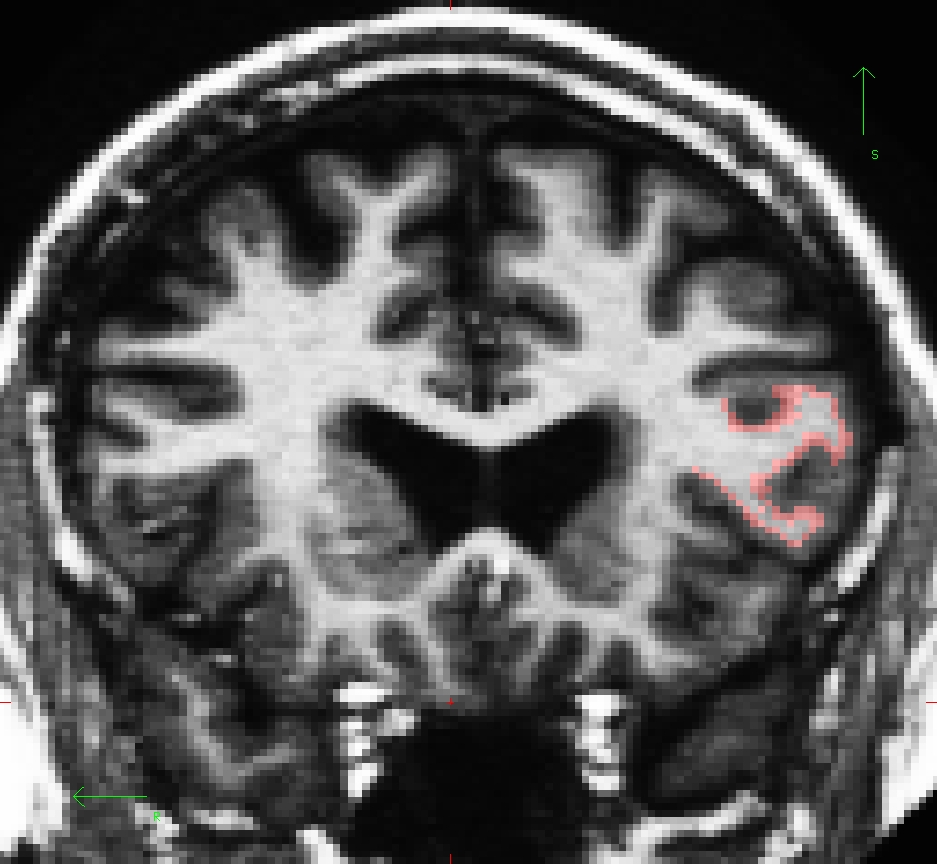
This label can be edited when the Select Voxels button is chosen. Use the middle mouse button to add to the label. Use the right mouse button to delete from the label. If this was your own subject, you would want to make sure you save your edits by going to File --> Label --> Save Label but it's not necessary for this tutorial.
To load the label in tksurfer, first load the subject (in another terminal window).
tksurfer 004 lh inflated
On the menu bar at the top of tksurfer tools window, go to File --> Label --> Load Label --> Browse --> lh.BA45.label
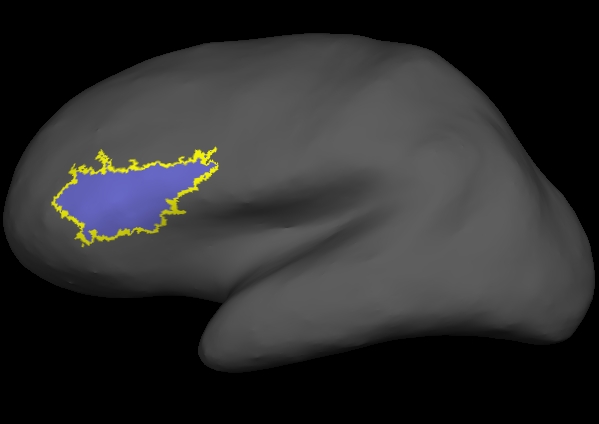
Information on how to create and edit labels in tksurfer can be found on this wiki. You don't have to do this for the tutorial, but please feel free to take a look if you are interested.
Individual Stats files
During the normal FreeSurfer processing stream, via the recon-all script some statistical output files are generated. They are kept in each subjects' stats/ subdirectory and are generated for the subcortical segmentation (aseg) and the cortical parcellation (aparc). These tables include information on each labeled region for the individual subject.
aseg.stats
The statistical output from the subcortical segmentation, called aseg.stats, is a regular text file and will contain the volumes of specific structures. For example, you can obtain information such as the volume of left hippocampus and its mean intensity from this file.
cd $SUBJECTS_DIR/004/stats
less aseg.stats
At the head of the text file there will be information about the command that was run, the version used, the user who ran it and a time stamp. Following this there is information about the volume of the entire brain.
The next section of this file defines the column headers, field name, and units for the rest of the table. We can expect to see the Segmentation Id, Number of Voxels, Volume, Structure Name, Intensity normMean, Intensity normStdDev, Intensity normMin, Intensity normMax, and Intensity normRange for each entry in the table.
The remainder of the table shows this information for all the structures that are labeled in the aseg.
# Title Segmentation Statistics
#
# generating_program mri_segstats
# cvs_version $Id: mri_segstats.c,v 1.69.2.1 2010/07/26 16:19:29 greve Exp $
# cmdline mri_segstats --seg mri/aseg.mgz --sum stats/aseg.stats --pv mri/norm.mgz --empty --excludeid 0 --excl-ctxgmwm --supratent --subcortgray --in mri/norm.mgz --in-intensity-name norm --in-intensity-units MR --etiv --surf-wm-vol --surf-ctx-vol --totalgray --ctab /autofs/cluster/freesurfer/test/subjects/x86_64/buckner_data/group_study_fs5.0.0/freesurfer-Linux-centos4_x86_64-stable-pub-v5.0.0/ASegStatsLUT.txt --subject 004
# sysname  Linux
# hostname compute-0-85.local
# machine  x86_64
# user     nicks
# anatomy_type volume
#
# SUBJECTS_DIR /autofs/cluster/freesurfer/test/subjects/x86_64/buckner_data/group_study_fs5.0.0
# subjectname 004
# Measure lhCortex, lhCortexVol, Left hemisphere cortical gray matter volume, 244507.719492, mm^3
# Measure rhCortex, rhCortexVol, Right hemisphere cortical gray matter volume, 249102.710448, mm^3
# Measure Cortex, CortexVol, Total cortical gray matter volume, 493610.429940, mm^3
# Measure lhCorticalWhiteMatter, lhCorticalWhiteMatterVol, Left hemisphere cortical white matter volume, 260412.984375, mm^3
# Measure rhCorticalWhiteMatter, rhCorticalWhiteMatterVol, Right hemisphere cortical white matter volume, 256990.187500, mm^3
# Measure CorticalWhiteMatter, CorticalWhiteMatterVol, Total cortical white matter volume, 517403.171875, mm^3
# Measure SubCortGray, SubCortGrayVol, Subcortical gray matter volume, 183995.000000, mm^3
# Measure TotalGray, TotalGrayVol, Total gray matter volume, 677605.429940, mm^3
# Measure SupraTentorial, SupraTentorialVol, Supratentorial volume, 1189372.762911, mm^3
# Measure IntraCranialVol, ICV, Intracranial Volume, 1792580.562856, mm^3
# SegVolFile mri/aseg.mgz
# SegVolFileTimeStamp  2010/08/12 21:00:31
# ColorTable /autofs/cluster/freesurfer/test/subjects/x86_64/buckner_data/group_study_fs5.0.0/freesurfer-Linux-centos4_x86_64-stable-pub-v5.0.0/ASegStatsLUT.txt
# ColorTableTimeStamp 2010/08/11 23:17:47
# InVolFile  mri/norm.mgz
# InVolFileTimeStamp  2010/08/12 16:27:10
# InVolFrame 0
# PVVolFile  mri/norm.mgz
# PVVolFileTimeStamp  2010/08/12 16:27:10
# Excluding Cortical Gray and White Matter
# ExcludeSegId 0 2 3 41 42
# VoxelVolume_mm3 1
-
-
-
# TableCol  1 ColHeader Index
# TableCol  1 FieldName Index
# TableCol  1 Units     NA
# TableCol  2 ColHeader SegId
# TableCol  2 FieldName Segmentation Id
# TableCol  2 Units     NA
# TableCol  3 ColHeader NVoxels
# TableCol  3 FieldName Number of Voxels
# TableCol  3 Units     unitless
# TableCol  4 ColHeader Volume_mm3
# TableCol  4 FieldName Volume
# TableCol  4 Units     mm^3
# TableCol  5 ColHeader StructName
# TableCol  5 FieldName Structure Name
# TableCol  5 Units     NA
-
-
-
# ColHeaders  Index SegId NVoxels Volume_mm3 StructName normMean normStdDev normMin normMax normRange
  1   4     31149    31149.0  Left-Lateral-Ventricle            21.2596    10.2600     6.0000    84.0000    78.0000
  2   5      1360     1360.0  Left-Inf-Lat-Vent                 37.3251    12.8335    12.0000    83.0000    71.0000
  3   7     12845    12845.0  Left-Cerebellum-White-Matter      87.6037     7.6264    40.0000   124.0000    84.0000
  4   8     48371    48371.0  Left-Cerebellum-Cortex            60.9231     9.6107    19.0000   107.0000    88.0000
  5  10      7197     7197.0  Left-Thalamus-Proper              85.0192    11.4083    21.0000   118.0000    97.0000
  6  11      5829     5829.0  Left-Caudate                      71.9549    11.1561    28.0000   109.0000    81.0000
  7  12      8389     8389.0  Left-Putamen                      77.1418     9.1256    26.0000   107.0000    81.0000
-
-
-
aparc.stats
The statistical output from the cortical parcellation, called lh.aparc.stats and rh.aparc.stats, is a regular text file and will contain the thickness of specific structures. For example, you can obtain information such as, how big is left superior temporal gyrus and its average thickness from this file.
cd $SUBJECTS_DIR/004/stats
less lh.aparc.stats
At the head of the text file there will be information about the command that was run, the version used, the user who ran it and a time stamp. Following this there is information about the volume of the entire brain. This shows the number of vertices in the cortex (NumVert), and the surface area of the cortex (SurfArea). This part of the file also tells us that the lh.aparc.annot is being used as the annotation file (AnnotationFile ../label/lh.aparc.annot).
The next section of this file defines the column headers, field name, and units for the rest of the table. We can expect to see the Structure Name, Number of Vertices, Surface Area, Gray Matter Volume, Average Thickness, Thickness StDev, Integrated Rectified Mean Curvature, Integrated Rectified Gaussian Curvature, Folding Index and Intrinsic Curvature Index for each entry in the table.
The remainder of the table shows this information for all the structures that are labeled in the aparc.
# Table of FreeSurfer cortical parcellation anatomical statistics
#
# CreationTime 2010/08/13-05:08:41-GMT
# generating_program mris_anatomical_stats
# cvs_version $Id: mris_anatomical_stats.c,v 1.68 2010/05/28 20:36:45 nicks Exp $
# mrisurf.c-cvs_version $Id: mrisurf.c,v 1.678 2010/05/28 21:22:21 rpwang Exp $
# cmdline mris_anatomical_stats -mgz -cortex ../label/lh.cortex.label -f ../stats/lh.aparc.stats -b -a ../label/lh.aparc.annot -c ../label/aparc.annot.ctab 004 lh white
# sysname  Linux
# hostname compute-0-85.local
# machine  x86_64
# user     nicks
#
# SUBJECTS_DIR /autofs/cluster/freesurfer/test/subjects/x86_64/buckner_data/group_study_fs5.0.0
# anatomy_type surface
# subjectname 004
# hemi lh
# AnnotationFile ../label/lh.aparc.annot
# AnnotationFileTimeStamp 2010/08/13 01:08:34
# Measure Cortex, NumVert, Number of Vertices, 142825, unitless
# Measure Cortex, SurfArea, Surface Area, 95354.8, mm^2
# Measure Cortex, MeanThickness, Mean Thickness, 2.31065, mm
-
-
-
# TableCol  1 ColHeader StructName
# TableCol  1 FieldName Structure Name
# TableCol  1 Units     NA
# TableCol  2 ColHeader NumVert
# TableCol  2 FieldName Number of Vertices
# TableCol  2 Units     unitless
# TableCol  3 ColHeader SurfArea
# TableCol  3 FieldName Surface Area
# TableCol  3 Units     mm^2
# TableCol  4 ColHeader GrayVol
# TableCol  4 FieldName Gray Matter Volume
# TableCol  4 Units     mm^3
# TableCol  5 ColHeader ThickAvg
# TableCol  5 FieldName Average Thickness
# TableCol  5 Units     mm
-
-
-
# ColHeaders StructName NumVert SurfArea GrayVol ThickAvg ThickStd MeanCurv GausCurv FoldInd CurvInd
bankssts                                 1630   1133   2693  2.331 0.489     0.137     0.042       19     2.9
caudalanteriorcingulate                  1248    805   2396  2.657 0.674     0.171     0.105       37     4.5
caudalmiddlefrontal                      3336   2205   6275  2.528 0.562     0.142     0.059       42     7.6
cuneus                                   2513   1597   3129  1.806 0.423     0.174     0.119      128     8.5
entorhinal                                566    403   1837  3.268 0.679     0.139     0.067        8     1.6
-
-
-
Group stats files
This section will run you through using the stats directory in the subjects to perform group stats of certain structures that may be of interest to your study. The following commands will help you combine the data of the subjects you are analyzing into one table that will be easily read into a spreadsheet program. We have considered 6 subjects as examples (004, 021, 040, 067, 080, 092) in the following sections.
Set your SUBJECTS_DIR to the path where you have your subjects to be analyzed.
setenv SUBJECTS_DIR $TUTORIAL_DATA/buckner_data/tutorial_subjs/group_analysis_tutorial
cd $SUBJECTS_DIR
Table of segmentation volumes
This section explains how to create a table of segmentation volumes using the 6 subjects mentioned above.
asegstats2table --subjects 004 021 040 067 080 092 \
  --segno 11 17 18 \
  --tablefile aseg.vol.table
where 11, 17 and 18 correspond to the segmentation label of left caudate, left hippocampus and left amygdala respectively. (You can create a table with all of the labels, not just these three, by omitting the --segno part.)
Click here if you would like to view the list of labels and their corresponding ID numbers again.
The file aseg.vol.table is your output - a text file consisting of the subjects mentioned in the command above and the values for the structures requested. The information in this text file is formatted so it can be easily imported into a spreadsheet program (often used as input for many statistical analysis programs). If you do the ls command, you should see that the text file aseg.vol.table has been created. To see what the file looks like, do:
less aseg.vol.table
To to load the resulting table into a spreadsheet, run:
gnumeric aseg.vol.table
Note: the gnumeric command is meant to be run on a Linux machine. Mac users could install OpenOffice 3.0 to open the table in a spreadsheet and run the command
/Applications/OpenOffice.org.app/Contents/MacOS/scalc aseg.vol.table
In the table, the first cell is volume indicating that the measure is a volume in mm3. In addition to segmentations, you can also get IntraCranialVol (ICV) and BrainSegVol into the table.
About the subject IDs, you'll notice that in the examples we've considered here, each subject is a 3 digit number. Therefore gnumeric thinks it is a number and removes leading 0s. This is a gnumeric issue but probably it would not happen if subject names had characters in them instead of integers.
Table of segmentation mean intensities
Purpose of this section is to demonstrate how you can change what measure you collect for your spreadsheet from volume to mean intensity using the asegstats2table command.
asegstats2table \
  --subjects 004 021 040 067 080 092 \
  --segno 11 17 18 \
  --meas mean \
  --tablefile aseg.mean-intensity.table
Things to do:
- You can load the table into a spreadsheet as explained in the previous section.
Refer to the file FreeSurferColorLUT.txt for the segmentation labels and the corresponding subcortical structures.
less $FREESURFER_HOME/FreeSurferColorLUT.txt
For tutorial purposes, click here to view the contents of the file.
Table of white matter parcellation volumes
The purpose of this section is to show how you can change which segmentation atlas you get stats from (and thus which structures):
asegstats2table \
  --subjects 004 021 040 067 080 092 \
  --segno 3007 3021 3022 4022 \
  --stats wmparc.stats \
  --tablefile wmparc.vol.table
Things to do:
- You can load the table into a spreadsheet.
Refer to the file FreeSurferColorLUT.txt for the segmentation labels and the corresponding subcortical structures.
less $FREESURFER_HOME/FreeSurferColorLUT.txt
For tutorial purposes, click here to view the contents of the file
Table of the surface area of each cortical parcellation in the Desikan atlas
This section explains how to create a table of the surface area of each cortical parcellation in the Desikan atlas (surface area is the default measure).
aparcstats2table --hemi lh \
  --subjects 004 021 040 067 080 092 \
  --tablefile lh.aparc.area.table
You can now load the resulting table into a spreadsheet.
Table of the average thickness of each cortical parcellation in the Destrieux atlas
The purpose of this section is to show how to change the summary measure and the parcellation atlas.
aparcstats2table --hemi lh \
  --subjects 004 021 040 067 080 092 \
  --meas thickness \
  --parc aparc.a2005s \
  --tablefile lh.aparc.a2005.thickness.table
You can now load the resulting table into a spreadsheet.