|
Size: 1352
Comment:
|
Size: 3635
Comment:
|
| Deletions are marked like this. | Additions are marked like this. |
| Line 1: | Line 1: |
| == FreeSurfer Tutorial Dataset == | == FreeSurfer Tutorial Data set == |
| Line 3: | Line 3: |
| Download the freesurfer tutorial data set using any of the following methods: | This page describes the setup process for running the [[FsTutorial|freesurfer tutorials]]. These instructions apply to users who want to run the tutorials on their personal machine, or users who are attending and upcoming freesurfer course and wish to use their own laptop, or as a guide for an administrator setting up a freesurfer course. |
| Line 5: | Line 5: |
| * Click the following link: ftp://surfer.nmr.mgh.harvard.edu/pub/data/tutorial_data.tar.gz |
## The [[FsTutorial|freesurfer course]] is a 3-4 workshop usually held 2x per year in the Boston area. It is a collection of talks, demos and tutorials #designed to help users become more accustomed to using freesurfer for the analyzing and processing of their MRI data. |
| Line 8: | Line 7: |
| * On Mac OSX platforms use 'curl -O' {{{curl -O ftp://surfer.nmr.mgh.harvard.edu/pub/data/tutorial_data.tar.gz}}} |
## The tutorial data set used during the course is provided to the public so that users may go thru these tutorials on their own without the need of attending #a freesurfer course. It may also be used by freesurfer course participants so that they can use their own computer during the course, instead of the one #provided to them at the course. |
| Line 11: | Line 9: |
| * On Linux platforms use 'wget' {{{wget ftp://surfer.nmr.mgh.harvard.edu/pub/data/tutorial_data.tar.gz}}} |
## Configuring your system so so that it may be used to perform these tutorials should be a fairly straightforward process and is described below: === 1. Install freesurfer === The first step is to install freesurfer on your personal machine. To install freesurfer, follow the instructions on [[https://surfer.nmr.mgh.harvard.edu/fswiki/DownloadAndInstall|the download and installation page]]. '''''Important Note:''' The tutorials require users to have the "development version" of freesurfer installed. So when it comes time so select the version for download do NOT select version 5.3, download the "development version" instead, which can be found [[ftp://surfer.nmr.mgh.harvard.edu/pub/dist/freesurfer/dev/|on this page]].'' |
| Line 15: | Line 17: |
| === 2. Download tutorial data === Before continuing, please ensure you have a functioning freesurfer installation by running the commands on the [[https://surfer.nmr.mgh.harvard.edu/fswiki/TestingFreeSurfer| testing freesurfer installation]] page. It would be pointless to continue otherwise. If you are having issues running the test commands, please follow the instructions on the [[https://surfer.nmr.mgh.harvard.edu/fswiki/SetupConfiguration|Setup and Configuaration page]]. |
|
| Line 17: | Line 22: |
| Once you have a functioning freesurfer installation, it is time to download the [[ftp://surfer.nmr.mgh.harvard.edu/pub/data/tutorial_data.tar.gz|freesurfer tutorial data set]]. When the download completes you will want to extract its contents. This can be done on most operating systems by simply double-clicking the file. '''''Remember the location of this directory. It is used throughout all of the tutorials.''''' The file should extract a directory called '''tutorial_data''' and its content should look as follows: | |
| Line 18: | Line 24: |
| {{attachment:Screen Shot 2015-08-24 at 2.55.20 PM.png}} | |
| Line 19: | Line 26: |
| The data for the [[FsTutorial| tutorials]] consists of several data sets: * buckner_data-tutorial_subjs.tar.gz: the main 'recon-all' stream subject data processing (size: ~16GB uncompressed)[[ftp://surfer.nmr.mgh.harvard.edu/pub/data/buckner_data-tutorial_subjs.md5sum.txt|Here is the md5sum]]. * long-tutorial.tar.gz: the longitudinal tutorial (size: ~16GB uncompressed) * fsfast-tutorial.subjects.tar.gz & fsfast-functional.tar.gz: the FS-FAST tutorial data set (size: ~5.6GB uncompressed & ~9.1GB uncompressed, respectively) * diffusion_recons.tar.gz & diffusion_tutorial.tar.gz - the diffusion and Tracula tutorial data sets * fbert-feat.tgz & bert.recon.tgz - tutorial on the integration of !FreeSurfer and FSL/FEAT |
=== 3. Configure your system === |
| Line 26: | Line 28: |
| If you only want to get started with the basics of !FreeSurfer, you need only download the buckner_data set. This will allow you to do the following tutorials: | To begin doing the tutorials open a terminal window and source freesurfer. Then create an environment variable called '''TUTORIAL_DATA''' and set it to the location of the extracted file from above. The '''TUTORIAL_DATA''' environment variable is required for all tutorials. The example below shows the commands to type AFTER sourcing freesurfer. If you type the {{{ls $TUTORIAL_DATA}}} command and see the directories extracted in step #2, you are ready to begin the [[FsTutorial|freesurfer tutorials]]. {{{ $> export TUTORIAL_DATA=/Users/localzeke/Downloads/tutorial_data $> ls $TUTORIAL_DATA buckner_data fsfast-functional diffusion_recons fsfast-tutorial.subjects diffusion_tutorial long-tutorial }}} {{attachment:Screen Shot 2015-08-24 at 4.56.51 PM.png}} |
FreeSurfer Tutorial Data set
This page describes the setup process for running the freesurfer tutorials. These instructions apply to users who want to run the tutorials on their personal machine, or users who are attending and upcoming freesurfer course and wish to use their own laptop, or as a guide for an administrator setting up a freesurfer course.
1. Install freesurfer
The first step is to install freesurfer on your personal machine. To install freesurfer, follow the instructions on the download and installation page. Important Note: The tutorials require users to have the "development version" of freesurfer installed. So when it comes time so select the version for download do NOT select version 5.3, download the "development version" instead, which can be found on this page.
2. Download tutorial data
Before continuing, please ensure you have a functioning freesurfer installation by running the commands on the testing freesurfer installation page. It would be pointless to continue otherwise. If you are having issues running the test commands, please follow the instructions on the Setup and Configuaration page.
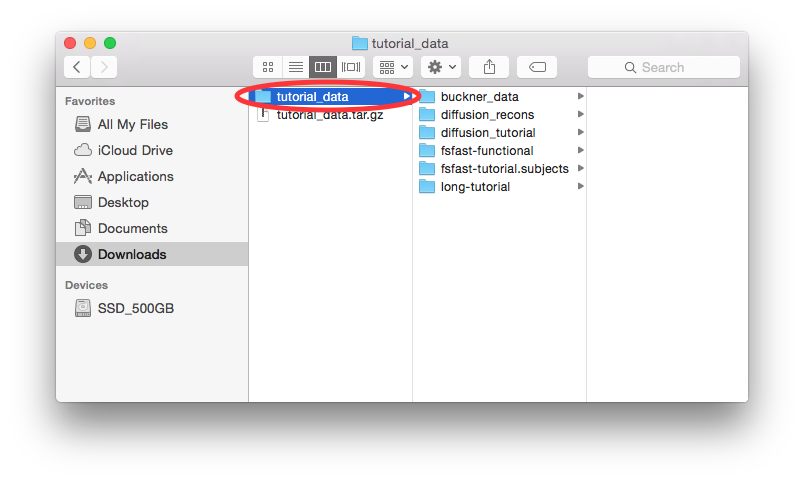
Once you have a functioning freesurfer installation, it is time to download the freesurfer tutorial data set. When the download completes you will want to extract its contents. This can be done on most operating systems by simply double-clicking the file. Remember the location of this directory. It is used throughout all of the tutorials. The file should extract a directory called tutorial_data and its content should look as follows:
3. Configure your system
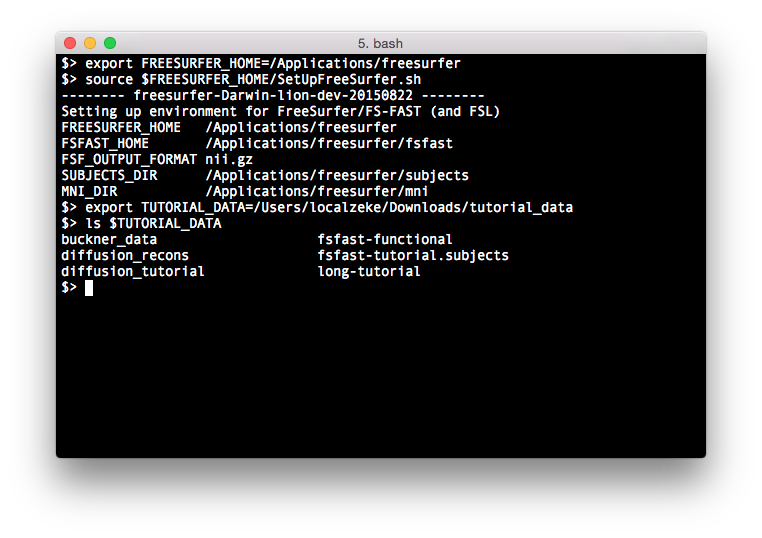
To begin doing the tutorials open a terminal window and source freesurfer. Then create an environment variable called TUTORIAL_DATA and set it to the location of the extracted file from above. The TUTORIAL_DATA environment variable is required for all tutorials. The example below shows the commands to type AFTER sourcing freesurfer. If you type the ls $TUTORIAL_DATA command and see the directories extracted in step #2, you are ready to begin the freesurfer tutorials.
$> export TUTORIAL_DATA=/Users/localzeke/Downloads/tutorial_data
$> ls $TUTORIAL_DATA
buckner_data                    fsfast-functional
diffusion_recons                fsfast-tutorial.subjects
diffusion_tutorial              long-tutorial