
|
Size: 4796
Comment:
|
Size: 8194
Comment:
|
| Deletions are marked like this. | Additions are marked like this. |
| Line 2: | Line 2: |
| '''Index''' [[TableOfContents]] |
'''Index''' <<TableOfContents>> |
| Line 8: | Line 6: |
| Line 11: | Line 10: |
| You might also be interested in how surface label atlases are created and used: SurfaceLabelAtlas | You might also be interested in these related topics: * Technical details on template file contents and format: TemplateTifImageFiles. * The possibility of registering subjects surfaces based on functional MRI data. See the script mksurfatlas that's part of the !FreeSurfer distibution. * How '''surface label atlases''' are created and used: SurfaceLabelAtlas === Disambiguation: template, atlas, parameterization file, average surface === * In many places, especially within the !FreeSurfer source code, the word '''"atlas"''' is often used interchangeably with "template". I am reserving the term "atlas" for the GCA files used in labeling regions. A template file is also sometimes referred to as a '''"parameterization file"'''. * The process of creating a template based on a number of reference subjects is sometimes called "making an average surface". This should not be confused with the process of averaging the surfaces of a group of subjects to create, for example, an average white surface (perhaps for plotting fMRI data). (This is what I think [[mris_make_average_surface]] does, and I think it's unrelated to the topic of this page. -- GW) |
| Line 14: | Line 22: |
(In the following "?h." refers to either of "lh." or "rh.".) |
(In the following "?h." refers to a file name hemisphere prefix of either "lh." or "rh.".) |
| Line 19: | Line 26: |
| === Inflated Spherical "version" of a subject's surface mesh === As the FreeSurfer pipeline processes a subject's data, the initial white surface mesh is "inflated" to several other states, one of which is a sphere, typically '''?h.sphere'''. The inflation process is constrainted to minimize the total distortion. |
== Inflated Spherical "version" of a subject's surface mesh == As the FreeSurfer pipeline processes a subject's data, the initial white surface mesh is "inflated" to several other states, one of which is a sphere, typically '''?h.sphere'''. The inflation process is constrainted to minimize the total distortion. |
| Line 22: | Line 29: |
| === Vertex-wise data is applicable to all versions of the surface === | == Vertex-wise data is applicable to all versions of the surface == ||<style="vertical-align: top;">The inflation process does not add or remove any vertices, so any data associated with the white vertices (such as curvature or convexity) is still associated with the same-numbered vertices of the sphere mesh. This is the basis of displays such as the following where a per-vertex variable "convexity" of the white surface (aka 'sulc') is plotted in color on the '''lh.sphere surface'''. || {{attachment:fsbert_sulc_sphere.jpg}} || |
| Line 24: | Line 32: |
| ||<^>The inflation process does not add or remove any vertices, so any data associated with the white vertices (such as curvature or convexity) is still associated with the same-numbered vertices of the sphere mesh. This is the basis of displays such as the following where a per-vertex variable "convexity" of the white surface (aka 'sulc') is plotted in color on the '''lh.sphere surface'''. || attachment:fsbert_sulc_sphere.jpg || | |
| Line 26: | Line 33: |
| === Registration of a subject's surface === | == Registration of a subject's surface == |
| Line 29: | Line 36: |
| === Registation output === ||<^>The output from registation is yet another version of the subject's surface mesh, typically named '''?h.sphere.reg''', with the x,y,z vertex positions still on a sphere, but warped so that the subject's curvature pattern best aligns with the template data. Here is the same convexity data, now plotted on the '''lh.sphere.reg''' surface. Similar pattern, but "stretched around".|| attachment:fsbert_sulc_spherereg.jpg || |
== Registration output == ||<style="vertical-align: top;">The output from registration is yet another version of the subject's surface mesh, typically named '''?h.sphere.reg''', with the x,y,z vertex positions still on a sphere, but warped so that the subject's curvature pattern best aligns with the template data. Here is the same convexity data, now plotted on the '''lh.sphere.reg''' surface. Similar pattern, but "stretched around". || {{attachment:fsbert_sulc_spherereg.jpg}} || |
| Line 32: | Line 39: |
| == Disambiguation: template, atlas, parameterization file == In many places, especially within the !FreeSurfer source code, the word '''"atlas"''' is often used interchangeably with "template". I am reserving the term atlas for the GCA files used in labeling regions. Further, a template file is sometimes referred to as a "parameterization file". |
|
| Line 36: | Line 41: |
| The diagram below summarizes the registration process. Program mris_register inputs a specific subject's ?h.sphere.reg file and associated sulc and curv data from the inflated and smoothwm surfaces. The program compares these to the template file input. The registration sphere, ?h.sphere.reg is output. | The diagram below summarizes the registration process. Program [[mris_register]] inputs a specific subject's ?h.sphere file and associated sulc and curv data from the inflated and smoothwm surfaces. The program compares these to the template file input. The registration sphere, ?h.sphere.reg is output. |
| Line 38: | Line 43: |
| attachment:gw_sphere_reg.gif | {{attachment:gw_sphere_reg.gif}} |
| Line 41: | Line 46: |
| The process of creating a template involves calculating an "average" pattern of curvature-related values, along with the variance of these variables. This task is performed by program mris_make_template. However, mris_make_template expects the input subjects to be already aligned (ie: already have ?h.sphere.reg files). This of course will not be the case if you are about to create a template! | (This section reports on what I (GW) have learned of the registration process from Bruce Fischl. and Doug Greve, along with reading the source code. I have not actually tried it.) |
| Line 43: | Line 48: |
| Consequently, the process proceeds iteratively, starting by creating a template from a single subject. Then two or more iterations are carried out where all the reference subjects are aligned to the latest template using mris_register, then a new template is created based on the latest alignments. This is diagrammed below. | The process of creating a template involves calculating a "mean" (across subjects) pattern of curvature-related values, along with the variance of these variables. This task is performed by program [[mris_make_template]]. However, mris_make_template expects the input subjects to be already aligned (ie: already have ?h.sphere.reg files). This of course will not be the case if you are about to create a template! |
| Line 45: | Line 50: |
| attachment:gw_make_template.gif | == Process Diagram == Consequently, the process proceeds iteratively, as shown in the following figure. |
| Line 47: | Line 53: |
| The blue box contains one iteration of the process, which can be repeated until the process converges sufficiently. | {{attachment:gw_make_template5.gif}} The process starts ("Prep") by choosing one reference subject, and producing a template (Here, mytemp0.tif). No ?h.sphere is required -- this step uses the subject's own pattern as the reference. If Round 1, all reference subjects data are registered to the initial template, producing ?h.sphere.myreg0. (I've coordinated the suffix numbers with the template used to produce the registration.) Using that registration, a new template (mytemp1.tif) is made using all reference subjects as input. Round 2 is essentially a repeat of Round 1, but produces an improved template (mytemp2.tif) because Round 2's initial registration step is based on a better template than in Round 1. Sidenote: [[mris_register]] performs more of a rigid registration when it notices that the input template has degrees-of-freedom=1, as it is in Round 1, being based on only one subject. When dof is higher, as in Round 2, mris_register performs a more flexible warp. The steps in the blue box could be iterated again if needed, but from what I've learned from Bruce F., this is generally not necessary. == Process Commands (DG) == Create an average subject (Creates $SUBJECTS_DIR/newtemplate) {{{ make_average_subject --out newtemplate --subjects subj1 subj2 subj3 ... }}} Register each subject to the new template (do for both lh and rh) Creates lh.sphere.reg.newtemplate and rh.sphere.reg.newtemplate {{{ foreach subject (subj1 subj2 subj3 ...) cd $SUBJECTS_DIR/subject mris_register -curv surf/lh.sphere \ $SUBJECTS_DIR/newtemplate/lh.reg.template.tif \ surf/lh.sphere.reg.newtemplate end }}} Get thickness values in the newtemplate space for GLM analysis {{{ mris_preproc --surfreg sphere.reg.newtemplate --s subj1 --s subj2 --s subj3 ... }}} Create another average template based on the previous one: (Creates $SUBJECTS_DIR/newnewtemplate) {{{ make_average_subject --out newnewtemplate --surf-reg sphere.reg.newtemplate \ --subjects subj1 subj2 subj3 ... }}} |
| Line 50: | Line 99: |
| 1. As of this date (2008-01-24), I have not verified that this process is entirely correct -- these are assembled from email exchanges with MGH staff, and from reading source code. | 1. The above diagram assumes that the subjects have all been processed once by !FreeSurfer's recon-all pipeline or similar to produce all the required files needed for the template-creation process. Recon-all will also have produced ?h.sphere.reg aligned to the standard reference template (?h.average.curvature.filled.buckner40.tif), and corresponding annotation files -- for purposes here, these can be ignored. Indeed, once a satisfactory new template has been created, the recon-all script can be modified to use the new template, and the subjects can be re-run to create new improved annotations. |
| Line 52: | Line 101: |
| 2. For technical details on the template file contents and format, see: TemplateTifImageFiles. | 2. GW comment: Since the process uses a particular subject as the starting point, the final position of the template pattern is dependent on that first subject. The iterations of registration and template creation work to improve the variance aspect of the template. 3. For technical details on the template file contents and format, see: TemplateTifImageFiles. |
| Line 58: | Line 109: |
| GrahamWideman | Graham Wideman (GrahamWideman) |
The Surface Registration Process; Templates
Index
Contents
Overview
This page provides an overview of two related topics:
How the FreeSurfer pipeline registers the surfaces of individual subjects to an "average" reference surface, using "template" ("tif") file.
The process of creating one's own template file, perhaps for subject groups or species for which the provided template is not suitable.
You might also be interested in these related topics:
Technical details on template file contents and format: TemplateTifImageFiles.
The possibility of registering subjects surfaces based on functional MRI data. See the script mksurfatlas that's part of the FreeSurfer distibution.
How surface label atlases are created and used: SurfaceLabelAtlas
Disambiguation: template, atlas, parameterization file, average surface
In many places, especially within the FreeSurfer source code, the word "atlas" is often used interchangeably with "template". I am reserving the term "atlas" for the GCA files used in labeling regions. A template file is also sometimes referred to as a "parameterization file".
The process of creating a template based on a number of reference subjects is sometimes called "making an average surface". This should not be confused with the process of averaging the surfaces of a group of subjects to create, for example, an average white surface (perhaps for plotting fMRI data). (This is what I think mris_make_average_surface does, and I think it's unrelated to the topic of this page. -- GW)
The FreeSurfer pipeline surface registration process
(In the following "?h." refers to a file name hemisphere prefix of either "lh." or "rh.".)
The registration process includes several key steps:
Inflated Spherical "version" of a subject's surface mesh
As the FreeSurfer pipeline processes a subject's data, the initial white surface mesh is "inflated" to several other states, one of which is a sphere, typically ?h.sphere. The inflation process is constrainted to minimize the total distortion.
Vertex-wise data is applicable to all versions of the surface
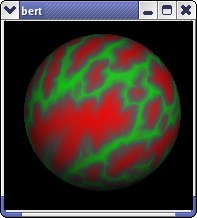
The inflation process does not add or remove any vertices, so any data associated with the white vertices (such as curvature or convexity) is still associated with the same-numbered vertices of the sphere mesh. This is the basis of displays such as the following where a per-vertex variable "convexity" of the white surface (aka 'sulc') is plotted in color on the lh.sphere surface. |
|
Registration of a subject's surface
Registration of a subject's surface to a reference consists of a 2-D warp of the subject's sphere surface so that the individual's curvature data pattern aligns with a reference template pattern. The template was previously prepared as the "average" (loosely speaking) pattern from a group of representative subjects. The standard template supplied with FreeSurfer is in the files {fshome}/average/?h.average.curvature.filled.buckner40.tif.
Registration output
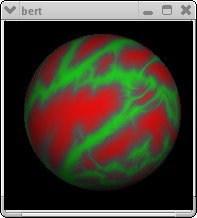
The output from registration is yet another version of the subject's surface mesh, typically named ?h.sphere.reg, with the x,y,z vertex positions still on a sphere, but warped so that the subject's curvature pattern best aligns with the template data. Here is the same convexity data, now plotted on the lh.sphere.reg surface. Similar pattern, but "stretched around". |
|
Registration process diagram
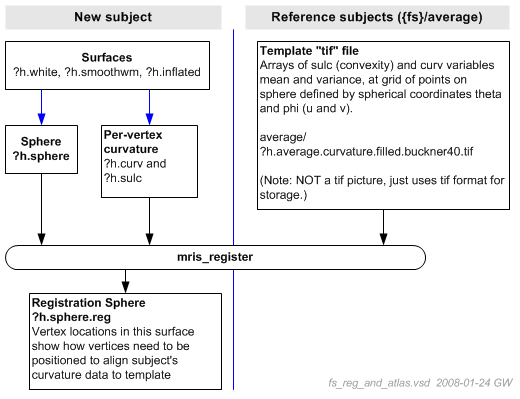
The diagram below summarizes the registration process. Program mris_register inputs a specific subject's ?h.sphere file and associated sulc and curv data from the inflated and smoothwm surfaces. The program compares these to the template file input. The registration sphere, ?h.sphere.reg is output.
Creating a registration template
(This section reports on what I (GW) have learned of the registration process from Bruce Fischl. and Doug Greve, along with reading the source code. I have not actually tried it.)
The process of creating a template involves calculating a "mean" (across subjects) pattern of curvature-related values, along with the variance of these variables. This task is performed by program mris_make_template. However, mris_make_template expects the input subjects to be already aligned (ie: already have ?h.sphere.reg files). This of course will not be the case if you are about to create a template!
Process Diagram
Consequently, the process proceeds iteratively, as shown in the following figure.
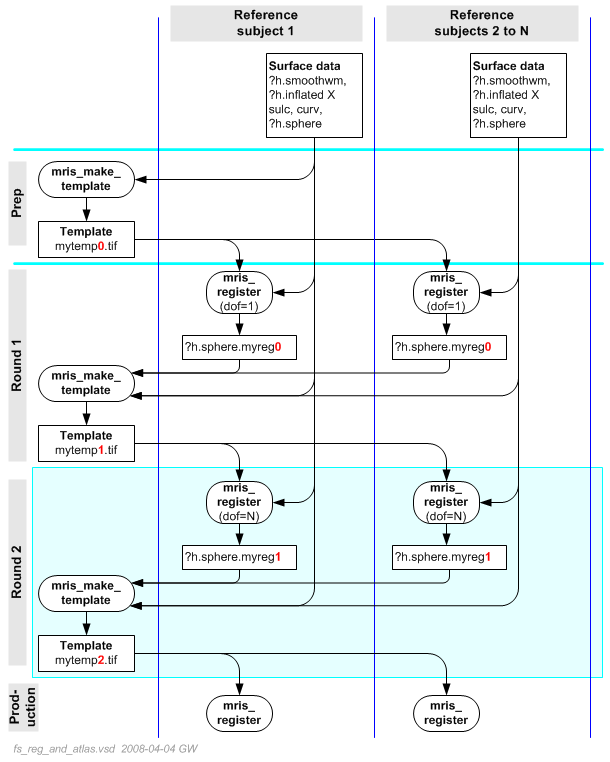
The process starts ("Prep") by choosing one reference subject, and producing a template (Here, mytemp0.tif). No ?h.sphere is required -- this step uses the subject's own pattern as the reference.
If Round 1, all reference subjects data are registered to the initial template, producing ?h.sphere.myreg0. (I've coordinated the suffix numbers with the template used to produce the registration.) Using that registration, a new template (mytemp1.tif) is made using all reference subjects as input.
Round 2 is essentially a repeat of Round 1, but produces an improved template (mytemp2.tif) because Round 2's initial registration step is based on a better template than in Round 1.
Sidenote: mris_register performs more of a rigid registration when it notices that the input template has degrees-of-freedom=1, as it is in Round 1, being based on only one subject. When dof is higher, as in Round 2, mris_register performs a more flexible warp.
The steps in the blue box could be iterated again if needed, but from what I've learned from Bruce F., this is generally not necessary.
Process Commands (DG)
Create an average subject (Creates $SUBJECTS_DIR/newtemplate)
make_average_subject --out newtemplate --subjects subj1 subj2 subj3 ...
Register each subject to the new template (do for both lh and rh) Creates lh.sphere.reg.newtemplate and rh.sphere.reg.newtemplate
foreach subject (subj1 subj2 subj3 ...)
  cd $SUBJECTS_DIR/subject
  mris_register -curv surf/lh.sphere \
     $SUBJECTS_DIR/newtemplate/lh.reg.template.tif \
     surf/lh.sphere.reg.newtemplate
end
Get thickness values in the newtemplate space for GLM analysis
mris_preproc --surfreg sphere.reg.newtemplate --s subj1 --s subj2 --s
subj3 ...
Create another average template based on the previous one: (Creates $SUBJECTS_DIR/newnewtemplate)
make_average_subject --out newnewtemplate --surf-reg
sphere.reg.newtemplate \
  --subjects subj1 subj2 subj3 ...
Notes
1. The above diagram assumes that the subjects have all been processed once by FreeSurfer's recon-all pipeline or similar to produce all the required files needed for the template-creation process. Recon-all will also have produced ?h.sphere.reg aligned to the standard reference template (?h.average.curvature.filled.buckner40.tif), and corresponding annotation files -- for purposes here, these can be ignored. Indeed, once a satisfactory new template has been created, the recon-all script can be modified to use the new template, and the subjects can be re-run to create new improved annotations.
2. GW comment: Since the process uses a particular subject as the starting point, the final position of the template pattern is dependent on that first subject. The iterations of registration and template creation work to improve the variance aspect of the template.
3. For technical details on the template file contents and format, see: TemplateTifImageFiles.
References
The registration process is a main topic in: High-resolution inter-subject averaging and a coordinate system for the cortical surface, Fischl, B., Sereno, M.I., Tootell, R.B.H., and Dale, A.M., (1999). Human Brain Mapping, 8:272-284(1999). See ArticlesSlidesAndPosters
Document Author(s)
Graham Wideman (GrahamWideman)