
|
Size: 1016
Comment:
|
Size: 3684
Comment:
|
| Deletions are marked like this. | Additions are marked like this. |
| Line 3: | Line 3: |
| This functionality is only available in the development version of !FreeSurfer. Rather than directly contacting the author, please post your questions on this module to the !FreeSurfer [[FreeSurferSupport|mailing list]]. <<BR>> {{attachment:skullstrips.png||height="300"}} <<BR>> |
'''''Robust, universal brain-extraction for images of any type.''''' |
| Line 9: | Line 7: |
| {{attachment:skullstrips.png||width="600"}} SynthStrip is a skull-stripping tool that accurately extracts brain signal from a landscape of image types, ranging across imaging modality, contrast, resolution, and subject population. It leverages a deep-learning strategy that synthesizes arbitrary training images from segmentation maps to optimize a robust model agnostic to acquisition specifics. |
|
| Line 10: | Line 12: |
The !SynthStrip command line tool can be be run within !FreeSurfer or as standalone utility using Docker or Singularity containers. '''Within !FreeSurfer:''' As of March 14 2022, the `synthstrip` command is available in the dev (nightly) !FreeSurfer distributions and will be included in the upcoming !FreeSurfer v7.3 release. If you do not want to install an entire !FreeSurfer distribution, you can run !SynthStrip through a standalone script that wraps either a Docker or Singularity container. To download either of these scripts, run the commands described below. Once downloaded, please read the brief instructions in the header of the downloaded script. This is especially necessary for the Singularity script, which requires setting up a one-time configuration. The downloaded scripts can be run directly, using the same command-line syntax defined in the ''Usage'' section below. '''Singularity:''' To download the Singularity-based wrapper script, run: {{{ curl -O https://surfer.nmr.mgh.harvard.edu/ftp/dist/freesurfer/synthstrip/synthstrip-singularity && chmod +x synthstrip-singularity }}} '''Docker:''' To download the Docker-based wrapper script, run: {{{ curl -O https://surfer.nmr.mgh.harvard.edu/ftp/dist/freesurfer/synthstrip/synthstrip-docker && chmod +x synthstrip-docker }}} The aim of these wrappers is to provide easy mechanisms for running SynthStrip containers, i.e. so users do not need to worry about mounting paths to input and output files, etc. For those interested, the underlying build image can be accessed from [[https://hub.docker.com/r/freesurfer/synthstrip|DockerHub]]. |
|
| Line 13: | Line 34: |
| Once installed, you can run !SynthStrip with the following: | Once installed, you can run !SynthStrip with the following command-line syntax: |
| Line 19: | Line 40: |
| In this command, `<input>` represents the path to the input image and `<stripped>` is the skull-stripped output. To also save the corresponding brain mask, the `-m` command line flag can be used to specify the mask output path. For additional options and command description, please use the `--help` flag. For the large majority of images with voxel sizes near 1 mm^3, !SynthStrip should run in less than 1 minute on the CPU. As image size (or resolution) increases, this runtime might increase as well. | '''Note:''' If using the Docker or Singularity wrappers, replace `synthstrip` with the downloaded script name, e.g. `synthstrip-singularity`. In this command, `<input>` represents the path to the input image and `<stripped>` is the skull-stripped output. To also save the corresponding brain mask, the `-m` command line flag can be used to specify the mask output path. For additional options and command description, please use the `--help` flag. For the large majority of images with voxel sizes near 1 mm^3^, !SynthStrip should run in less than 1 minute on the CPU. As image size (or resolution) increases, this runtime might increase as well. |
| Line 22: | Line 45: |
In the SynthStrip publication, we gather a test collection of public datasets that span across acquisition type and subject population. We make this subset of images, with ground-truth brain mask labels, available for download as a [[https://surfer.nmr.mgh.harvard.edu/ftp/dist/freesurfer/synthstrip/synthstrip_data_v1.tar.gz|compressed tar archive]]. Note that we only distribute images from datasets that we have permission for, which includes the IXI, ASL, FSM, and INFANT cohorts. A breakdown of the datasets is available in the README of the archive, and please be sure to cite the relevant work (more details in the README) if you use any of this data in a publication. |
SynthStrip
Robust, universal brain-extraction for images of any type.
1. Overview
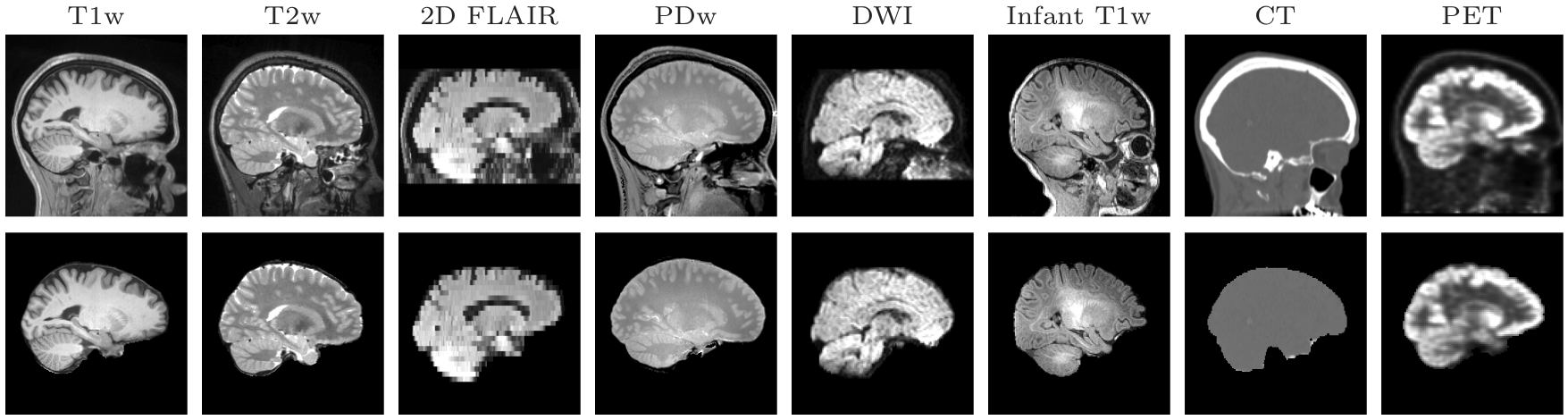
SynthStrip is a skull-stripping tool that accurately extracts brain signal from a landscape of image types, ranging across imaging modality, contrast, resolution, and subject population. It leverages a deep-learning strategy that synthesizes arbitrary training images from segmentation maps to optimize a robust model agnostic to acquisition specifics.
2. Installation
The SynthStrip command line tool can be be run within FreeSurfer or as standalone utility using Docker or Singularity containers.
Within FreeSurfer: As of March 14 2022, the synthstrip command is available in the dev (nightly) FreeSurfer distributions and will be included in the upcoming FreeSurfer v7.3 release.
If you do not want to install an entire FreeSurfer distribution, you can run SynthStrip through a standalone script that wraps either a Docker or Singularity container. To download either of these scripts, run the commands described below. Once downloaded, please read the brief instructions in the header of the downloaded script. This is especially necessary for the Singularity script, which requires setting up a one-time configuration. The downloaded scripts can be run directly, using the same command-line syntax defined in the Usage section below.
Singularity: To download the Singularity-based wrapper script, run:
curl -O https://surfer.nmr.mgh.harvard.edu/ftp/dist/freesurfer/synthstrip/synthstrip-singularity && chmod +x synthstrip-singularity
Docker: To download the Docker-based wrapper script, run:
curl -O https://surfer.nmr.mgh.harvard.edu/ftp/dist/freesurfer/synthstrip/synthstrip-docker && chmod +x synthstrip-docker
The aim of these wrappers is to provide easy mechanisms for running SynthStrip containers, i.e. so users do not need to worry about mounting paths to input and output files, etc. For those interested, the underlying build image can be accessed from DockerHub.
3. Usage
Once installed, you can run SynthStrip with the following command-line syntax:
synthstrip -i <input> -o <stripped>
Note: If using the Docker or Singularity wrappers, replace synthstrip with the downloaded script name, e.g. synthstrip-singularity.
In this command, <input> represents the path to the input image and <stripped> is the skull-stripped output. To also save the corresponding brain mask, the -m command line flag can be used to specify the mask output path. For additional options and command description, please use the --help flag. For the large majority of images with voxel sizes near 1 mm3, SynthStrip should run in less than 1 minute on the CPU. As image size (or resolution) increases, this runtime might increase as well.
4. Evaluation Dataset
In the SynthStrip publication, we gather a test collection of public datasets that span across acquisition type and subject population. We make this subset of images, with ground-truth brain mask labels, available for download as a compressed tar archive. Note that we only distribute images from datasets that we have permission for, which includes the IXI, ASL, FSM, and INFANT cohorts. A breakdown of the datasets is available in the README of the archive, and please be sure to cite the relevant work (more details in the README) if you use any of this data in a publication.