|
Size: 3666
Comment:
|
← Revision 23 as of 2011-05-26 18:48:43 ⇥
Size: 4788
Comment:
|
| Deletions are marked like this. | Additions are marked like this. |
| Line 1: | Line 1: |
| [[FsTutorial|top]] | [[FsTutorial/LongitudinalTutorial|previous]] | [[FsTutorial|top]] | [[FsTutorial/LongitudinalTutorial|Longitudinal Tutorial]] |
| Line 6: | Line 6: |
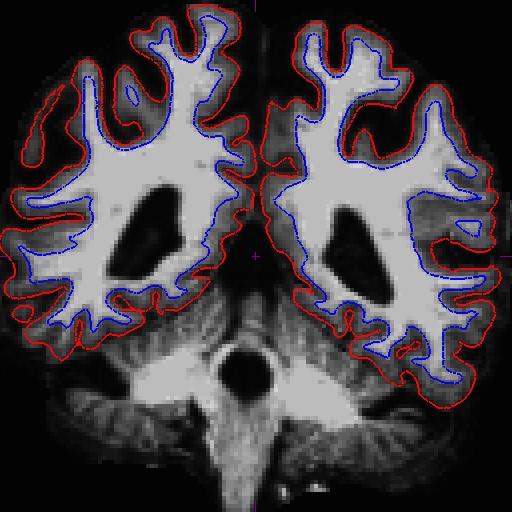
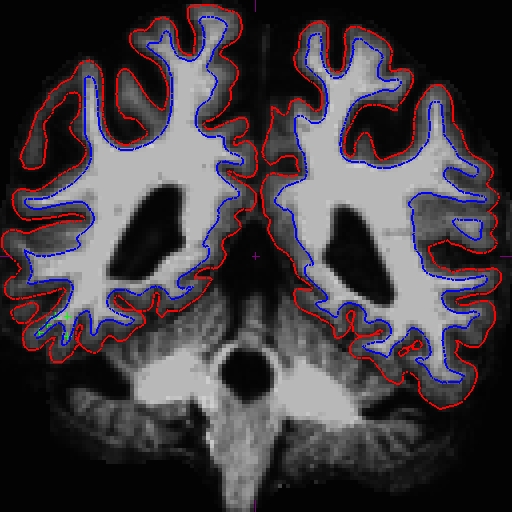
| Here is the image of OAS2_0121_MR1_before (slice 87) and OAS2_0121_MR2_before (slice 93). These are from the cross-sectional data.<<BR>> {{attachment:0121MR1_87.jpg}} {{attachment:0121MR2_93.jpg}} |
<<TableOfContents>> |
| Line 9: | Line 8: |
| Notice that the intensity for this area is only around 90 something instead of 110. You should put control points on these slices and all the adjacent ones. Because this problem occurs in both cross-sectionals, the base, and subsequently the longitudinals, are also affected. In cases like this, it depends on which data you are planning to use, you can choose to edit either the cross, base, or long. Control points work in all three stages. | Notice that the intensity for the area in the bottom corner of the right hemisphere around slice 90 is only around 90 something instead of 110, and the surfaces here do not include all of the gm and wm. Because this problem occurs in both cross-sectionals, the base and subsequently the longitudinals are also affected. In cases like this, it depends on which data you are planning to use, you can choose to edit either the cross, base, or long. Control points work in all three stages. |
| Line 11: | Line 10: |
| In this example, we're demonstrating what the effect will be when adding control points at the very beginning of the stream - in the cross-sectionals. Find all the slices that have this problem and add control points carefully on the wm voxels. | |
| Line 12: | Line 12: |
| '''<<TableOfContents>>''' | === Fixing the cross === |
| Line 14: | Line 14: |
| === Adding control points in the cross-sectionals === In this example, we're demonstrating what the effect will be when adding control points at the very beginning of the stream - in the cross-sectionals. |
Here is what we did. Left - OAS2_0121_MR1 (slice 87) and right - OAS2_0121_MR2 (slice 90). <<BR>> {{attachment:0121_tp1_87_before.jpg}} {{attachment:0121_tp2_90_before.jpg}} |
| Line 17: | Line 17: |
| After you are satisfied with your control points placements, save it, and run the following commands. | Once you are satisfied with your control points placements, save it, and run the following commands to complete the fixed cross sectional runs: |
| Line 19: | Line 19: |
| recon-all -autorecon2 -autorecon3 -subjid OAS2_0121_MR1_before recon-all -autorecon2 -autorecon3 -subjid OAS2_0121_MR2_before |
recon-all -subjid OAS2_0121_MR1 -autorecon2 -autorecon3 recon-all -subjid OAS2_0121_MR2 -autorecon2 -autorecon3 |
| Line 23: | Line 23: |
| After that is complete (or when the CA normalization step is complete - you can check in the recon-all-status.log), you can start rerunning the base. | After that is complete (or when the CA normalization step is complete - you can check in the recon-all-status.log), you can start rerunning the base (remember to delete or rename the base if it already existed, e.g. {{{mv OAS2_0121 OAS2_0121_old}}}). Or, if you prefer, you can wait until the recons are complete to check whether you are satisfied with the results before beginning the next step. To check the fixed version of these two timepoints, run (in different terminals): |
| Line 25: | Line 27: |
| recon-all -base OAS2_0121 -tp OAS2_0121_MR1_before* -tp OAS2_0121_MR2_before* -all | tkmedit OAS2_0121_MR1_fixed brainmask.mgz -aux T1.mgz -surfs tkmedit OAS2_0121_MR2_fixed brainmask.mgz -aux T1.mgz -surfs |
| Line 28: | Line 31: |
| The last step is to rerun the longitudinals (it is best to remove the existing longitudinal directories). | === Fixing/Rerunning the base === To rerun the base, run this command: |
| Line 30: | Line 34: |
| recon-all -long OAS2_0121_MR1_before* OAS2_0121 -all recon-all -long OAS2_0121_MR2_before* OAS2_0121 -all |
recon-all -base OAS2_0121 -tp OAS2_0121_MR1 -tp OAS2_0121_MR2 -all |
| Line 34: | Line 37: |
| *note: Here we use OAS2_0121_MR1_before and OAS2_0121_MR2_before as the cross ids to keep it consistent with the files you are using for the edits, but note that in your actual data, when rerunning the base or the longitudinals, the ids cannot be renamed to something else (e.g. _before, _edit) unless it's after it's already ran/reran. So if you want a copy of the before version, rename that to tpid_before and edit the tpid version. ---- To look at the output, open your subject in tkmedit using the following commands. |
Once you are done with the base, check to see whether the surfaces are now including all white matter. |
| Line 38: | Line 39: |
| tkmedit OAS2_0121_fixed brainmask.mgz -aux T1.mgz -surfs | tkmedit OAS2_0121_intermediate brainmask.mgz -aux T1.mgz -surfs |
| Line 41: | Line 42: |
| Notice that although the surfaces improved, it is not perfect. In this case, you can add more control points to the base and rerun with the command below (you can only run the base without the _intermediate suffix so if you have no reason to rename it, there is no need to): | |
| Line 42: | Line 44: |
| tkmedit OAS2_0121_MR1.long.OAS2_0121_fixed brainmask.mgz -aux T1.mgz -surfs tkmedit OAS2_0121_MR2.long.OAS2_0121_fixed brainmask.mgz -aux T1.mgz -surfs |
recon-all -base OAS2_0121 -autorecon2 -autorecon3 |
| Line 46: | Line 47: |
| Now the base is much better. Compare these images at slice 109 (we removed the pial surface in order to have a better view). These are taken from OAS2_0121_intermediate (the mid point) and OAS2_0121_fixed (final results). You can open these using tkmedit, and also the original base (OAS2_0121) if you want. You will not see the control points as shown on the intermediate base since this file is only the output and no interventions had taken place.<<BR>> {{attachment:0121_109_int.jpg}} {{attachment:0121_109_after.jpg}} |
|
| Line 47: | Line 50: |
| Here are the output images of the base. You can see the difference in the surfaces from the before (left) and after (right) image at slice 108, although no control points were copied over.<<BR>> {{attachment:0121_108_before.jpg}} {{attachment:0121_108_after.jpg}} |
=== Rerunning the long === The last step is to rerun the longitudinals (also remove/rename existing longitudinal directories first): {{{ recon-all -long OAS2_0121_MR1 OAS2_0121 -all recon-all -long OAS2_0121_MR2 OAS2_0121 -all }}} ---- Look at the output in tkmedit. We also reran the long using the intermediate base to see what it would look like. You can open all three and compare using the following commands (you can do it for both MR1 and MR2): {{{ tkmedit OAS2_0121_MR1.long.OAS2_0121 brainmask.mgz -aux T1.mgz -surfs tkmedit OAS2_0121_MR1.long.OAS2_0121_intermediate brainmask.mgz -aux T1.mgz -surfs tkmedit OAS2_0121_MR1.long.OAS2_0121_fixed brainmask.mgz -aux T1.mgz -surfs }}} |
| Line 50: | Line 64: |
| As for the longitudinals, control points were copied over from the cross-sectionals, and the surfaces were copied from base, therefore making a great improvement on the surfaces for the longitudinals. | For the longitudinals, control points were automatically copied over from the cross-sectionals, and the surfaces were initialized from the base, therefore making a great improvement on the surfaces at this end of the stream. |
| Line 52: | Line 66: |
| The before (left) and after (right) images from OAS2_0121_MR1.long.OAS2_0121 at slice 107. {{attachment:0121MR1long_107_before.jpg}} {{attachment:0121MR1long_107_after.jpg}} |
The before (left) and after (right) images from OAS2_0121_MR1.long.OAS2_0121 at slice 107.<<BR>> {{attachment:0121_long1_107_before.jpg}} {{attachment:0121_long1_107_after.jpg}} |
| Line 55: | Line 69: |
| The before (left) and after (right) images from OAS2_0121_MR2.long.OAS2_0121 at slice 108. {{attachment:0121MR2long_108_before.jpg}} {{attachment:0121MR2long_108_after.jpg}} ---- === Adding control points in the base === |
The before (left) and after (right) images from OAS2_0121_MR2.long.OAS2_0121 at slice 106.<<BR>> {{attachment:0121_long2_106_before.jpg}} {{attachment:0121_long2_106_after.jpg}} |
Using Control Points to Fix Intensity Normalization
To follow this exercise exactly be sure you've downloaded the tutorial data set before you begin. If you choose not to download the data set you can follow these instructions on your own data, but you will have to substitute your own specific paths and subject names.
Contents
Notice that the intensity for the area in the bottom corner of the right hemisphere around slice 90 is only around 90 something instead of 110, and the surfaces here do not include all of the gm and wm. Because this problem occurs in both cross-sectionals, the base and subsequently the longitudinals are also affected. In cases like this, it depends on which data you are planning to use, you can choose to edit either the cross, base, or long. Control points work in all three stages.
In this example, we're demonstrating what the effect will be when adding control points at the very beginning of the stream - in the cross-sectionals. Find all the slices that have this problem and add control points carefully on the wm voxels.
Fixing the cross
Here is what we did. Left - OAS2_0121_MR1 (slice 87) and right - OAS2_0121_MR2 (slice 90).
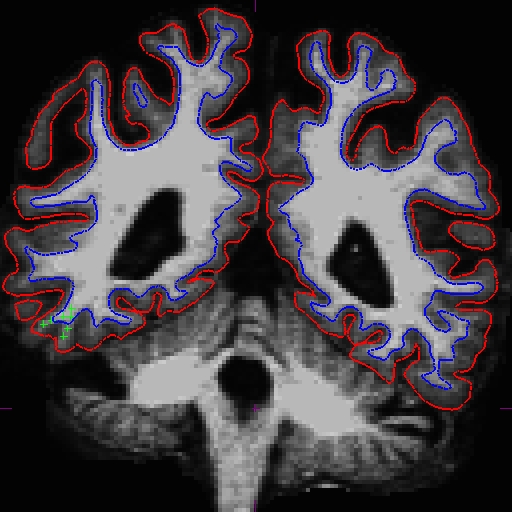
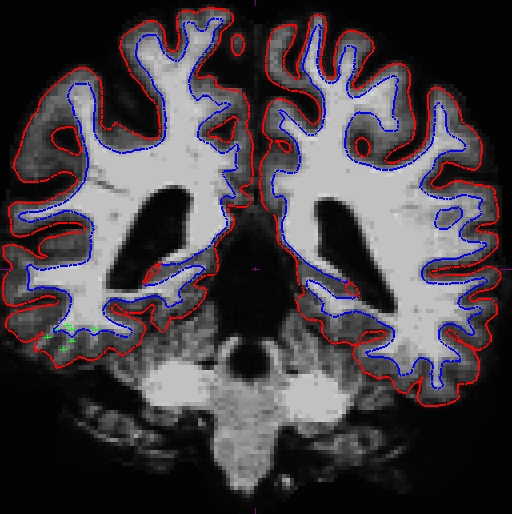
Once you are satisfied with your control points placements, save it, and run the following commands to complete the fixed cross sectional runs:
recon-all -subjid OAS2_0121_MR1 -autorecon2 -autorecon3 recon-all -subjid OAS2_0121_MR2 -autorecon2 -autorecon3
After that is complete (or when the CA normalization step is complete - you can check in the recon-all-status.log), you can start rerunning the base (remember to delete or rename the base if it already existed, e.g. mv OAS2_0121 OAS2_0121_old). Or, if you prefer, you can wait until the recons are complete to check whether you are satisfied with the results before beginning the next step.
To check the fixed version of these two timepoints, run (in different terminals):
tkmedit OAS2_0121_MR1_fixed brainmask.mgz -aux T1.mgz -surfs
tkmedit OAS2_0121_MR2_fixed brainmask.mgz -aux T1.mgz -surfs
Fixing/Rerunning the base
To rerun the base, run this command:
recon-all -base OAS2_0121 -tp OAS2_0121_MR1 -tp OAS2_0121_MR2 -all
Once you are done with the base, check to see whether the surfaces are now including all white matter.
tkmedit OAS2_0121_intermediate brainmask.mgz -aux T1.mgz -surfs
Notice that although the surfaces improved, it is not perfect. In this case, you can add more control points to the base and rerun with the command below (you can only run the base without the _intermediate suffix so if you have no reason to rename it, there is no need to):
recon-all -base OAS2_0121 -autorecon2 -autorecon3
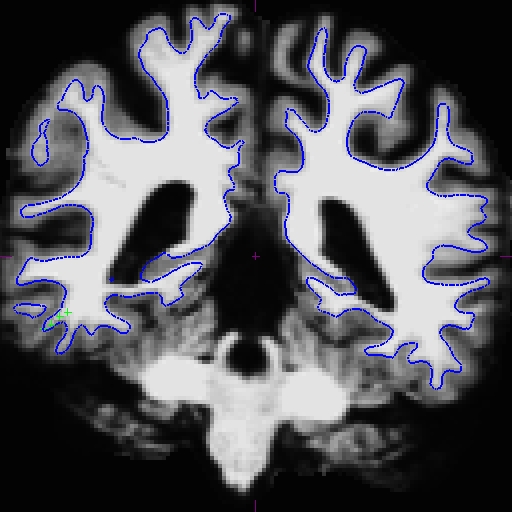
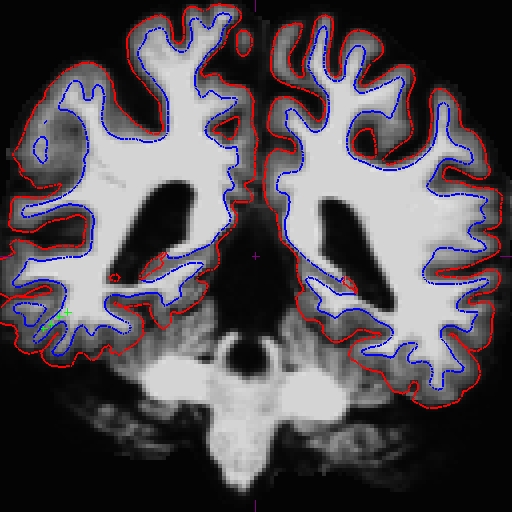
Now the base is much better. Compare these images at slice 109 (we removed the pial surface in order to have a better view). These are taken from OAS2_0121_intermediate (the mid point) and OAS2_0121_fixed (final results). You can open these using tkmedit, and also the original base (OAS2_0121) if you want. You will not see the control points as shown on the intermediate base since this file is only the output and no interventions had taken place.
Rerunning the long
The last step is to rerun the longitudinals (also remove/rename existing longitudinal directories first):
recon-all -long OAS2_0121_MR1 OAS2_0121 -all
recon-all -long OAS2_0121_MR2 OAS2_0121 -all
Look at the output in tkmedit. We also reran the long using the intermediate base to see what it would look like. You can open all three and compare using the following commands (you can do it for both MR1 and MR2):
tkmedit OAS2_0121_MR1.long.OAS2_0121 brainmask.mgz -aux T1.mgz -surfs
tkmedit OAS2_0121_MR1.long.OAS2_0121_intermediate brainmask.mgz -aux T1.mgz -surfs
tkmedit OAS2_0121_MR1.long.OAS2_0121_fixed brainmask.mgz -aux T1.mgz -surfs
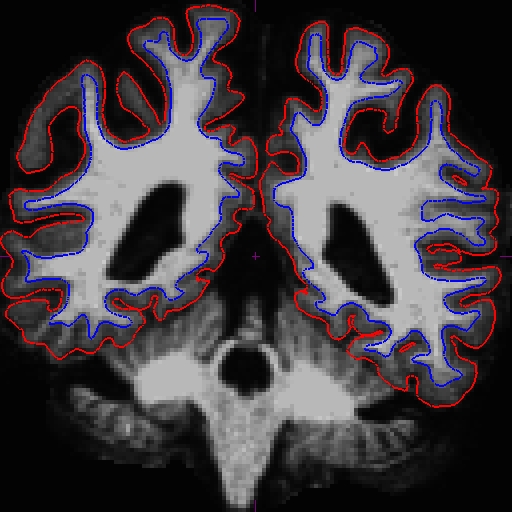
For the longitudinals, control points were automatically copied over from the cross-sectionals, and the surfaces were initialized from the base, therefore making a great improvement on the surfaces at this end of the stream.
The before (left) and after (right) images from OAS2_0121_MR1.long.OAS2_0121 at slice 107.
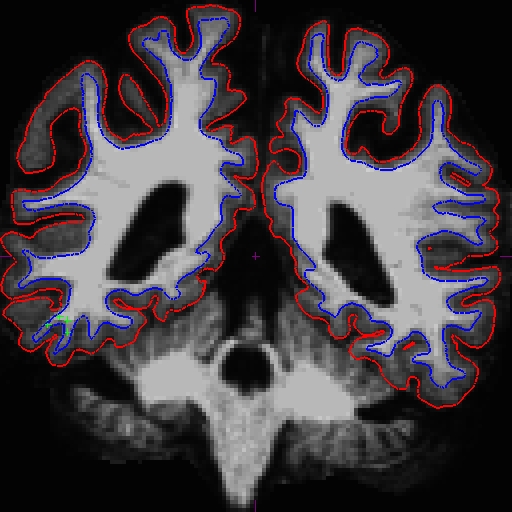
The before (left) and after (right) images from OAS2_0121_MR2.long.OAS2_0121 at slice 106.