|
Size: 2697
Comment:
|
Size: 3584
Comment:
|
| Deletions are marked like this. | Additions are marked like this. |
| Line 1: | Line 1: |
| [[FsTutorial|top]] | [[FsTutorial/LongitudinalTutorial|Longitudinal Tutorial]] | [[FsTutorial|top]] | [[FsTutorial/LongitudinalTutorial_freeview|Longitudinal Tutorial]] |
| Line 4: | Line 5: |
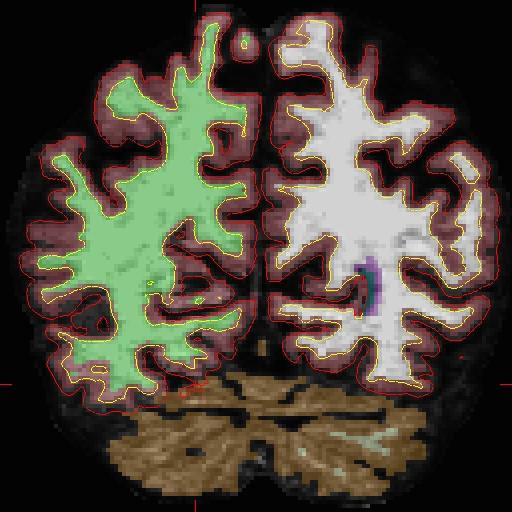
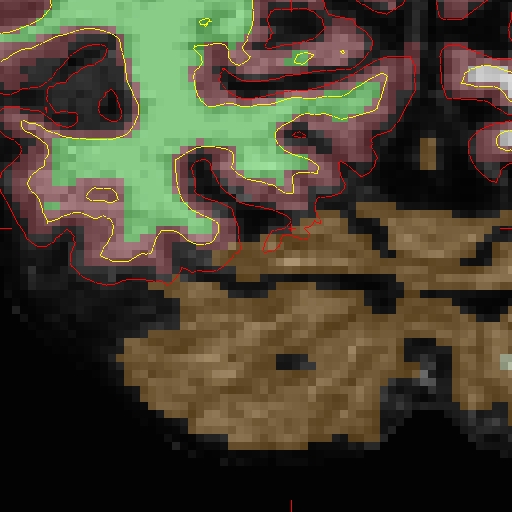
| Here we will look at the second time point ( OAS2_0002_MR2). In the brain.finalsurfs.mgz volume (your aux volume in tkmedit) you can see the pial surface encroaching into the cerebellum in slices 65 - 68: Representative slice 68 shown below, problem at coordinates 111 136 68 in right hemisphere <<BR>> {{attachment:mr2BEFORE.jpg}} Zoomed in version is below <<BR>> {{attachment:mr2BEFOREzoomed.jpg}} |
Here we will look at the second time point ( OAS2_0002_MR2). In the brain.finalsurfs.mgz volume (your aux volume in tkmedit) you can see the pial surface encroaching into the cerebellum in slices 65 - 68: Representative slice 68 shown below, problem at coordinates 111 136 68 in right hemisphere (and zoom-in): <<BR>> {{attachment:mr2BEFORE.jpg}} {{attachment:mr2BEFOREzoomed.jpg}} <<BR>> |
| Line 8: | Line 9: |
| Line 11: | Line 13: |
| When recon-all is rerun, it will find the ...manedit.. file and knows that we want to incorporate manual edits. Next, load the brain.finalsurfs.manedit.mgz volume as the aux volume in tkmedit and edit this volume by going through the affected slices and removing the voxels in the cerebellum and surrounding areas that cause the pial surface misplacement. Once you are finished editing, save the changes to the volume with File – Save Aux volume. Next, run the following to have the edits take effect: |
When recon-all is rerun, it will find the ...manedit.. file and knows that we want to incorporate manual edits. Next, load the brain.finalsurfs.manedit.mgz volume as the aux volume in tkmedit and edit this volume by going through the affected slices and removing the voxels in the cerebellum and surrounding areas that cause the pial surface misplacement. Once you are finished editing, save the changes to the volume with File – Save Aux volume. Next, run the following to have the edits take effect: |
| Line 18: | Line 19: |
| Line 19: | Line 21: |
| tkmedit OAS2_0002_MR2_fixed brainmask.mgz -aux brain.finalsurfs.mgz -surfs -segmentation aseg.mgz $FREESURFER_HOME/FreeSurferColorLUT.txt | freeview -v OAS2_0002_MR2_fixed/mri/brainmask.mgz \ OAS2_0002_MR2_fixed/mri/brain.finalsurfs.manedit.mgz \ OAS2_0002_MR2_fixed/mri/aseg.mgz:colormap=lut:opacity=0.25 \ -f OAS2_0002_MR2_fixed/surf/lh.pial:edgecolor=red \ OAS2_0002_MR2_fixed/surf/rh.pial:edgecolor=red \ OAS2_0002_MR2_fixed/surf/lh.white:edgecolor=blue \ OAS2_0002_MR2_fixed/surf/rh.white:edgecolor=blue |
| Line 21: | Line 29: |
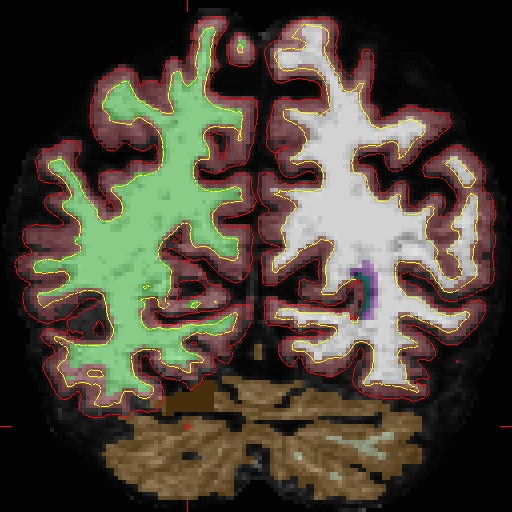
| Notice how the pial surface is now pulled in based on the deleted voxels <<BR>> {{attachment:mr2FIXED.jpg}} Zoomed in version <<BR>> {{attachment:mr2FIXEDzoomed.jpg}} After looking at and fixing the problem in MR2, open MR1, and find the corresponding problem area (will be found in a similar slice range): |
Notice how the pial surface is now pulled in based on the deleted voxels (and zoom-in): <<BR>> {{attachment:mr2FIXED.jpg}} {{attachment:mr2FIXEDzoomed.jpg}} <<BR>> After looking at and fixing the problem in MR2, open MR1, and find the corresponding problem area (look in similar slice range): |
| Line 25: | Line 34: |
| tkmedit OAS2_0002_MR1 brainmask.mgz -aux brain.finalsurfs.mgz -surfs -segmentation aseg.mgz $FREESURFER_HOME/FreeSurferColorLUT.txt | freeview -v OAS2_0002_MR1/mri/brainmask.mgz \ OAS2_0002_MR1/mri/brain.finalsurfs.manedit.mgz \ OAS2_0002_MR1/mri/aseg.mgz:colormap=lut:opacity=0.25 \ -f OAS2_0002_MR1/surf/lh.pial:edgecolor=red \ OAS2_0002_MR1/surf/rh.pial:edgecolor=red \ OAS2_0002_MR1/surf/lh.white:edgecolor=blue \ OAS2_0002_MR1/surf/rh.white:edgecolor=blue |
| Line 28: | Line 43: |
| Line 29: | Line 45: |
| tkmedit OAS2_0002_MR1_fixed brainmask.mgz -aux brain.finalsurfs.mgz -surfs -segmentation aseg.mgz $FREESURFER_HOME/FreeSurferColorLUT.txt | freeview -v OAS2_0002_MR1_fixed/mri/brainmask.mgz \ OAS2_0002_MR1_fixed/mri/brain.finalsurfs.manedit.mgz \ OAS2_0002_MR1_fixed/mri/aseg.mgz:colormap=lut:opacity=0.25 \ -f OAS2_0002_MR1_fixed/surf/lh.pial:edgecolor=red \ OAS2_0002_MR1_fixed/surf/rh.pial:edgecolor=red \ OAS2_0002_MR1_fixed/surf/lh.white:edgecolor=blue \ OAS2_0002_MR1_fixed/surf/rh.white:edgecolor=blue |
| Line 31: | Line 53: |
| Next, it is time to fix the base for this subject - return to the [[FsTutorial/LongitudinalTutorial|Longitudinal Tutorial]] to see how. | Next, it is time to fix the base for this subject - return to the [[FsTutorial/LongitudinalTutorial_freeview|Longitudinal Tutorial]] to see how. |
Making FinalSurf edits
To follow this exercise exactly be sure you've downloaded the tutorial data set before you begin. If you choose not to download the data set you can follow these instructions on your own data, but you will have to substitute your own specific paths and subject names.
Here we will look at the second time point ( OAS2_0002_MR2). In the brain.finalsurfs.mgz volume (your aux volume in tkmedit) you can see the pial surface encroaching into the cerebellum in slices 65 - 68: Representative slice 68 shown below, problem at coordinates 111 136 68 in right hemisphere (and zoom-in):
First make a copy of this volume to one called 'brain.finalsurfs.manedit.mgz' and save it within the mri directory of this time point, along with the other volumes.
cp OAS2_0002_MR2/mri/brain.finalsurfs.mgz OAS2_0002_MR2/mri/brain.finalsurfs.manedit.mgz
When recon-all is rerun, it will find the ...manedit.. file and knows that we want to incorporate manual edits. Next, load the brain.finalsurfs.manedit.mgz volume as the aux volume in tkmedit and edit this volume by going through the affected slices and removing the voxels in the cerebellum and surrounding areas that cause the pial surface misplacement. Once you are finished editing, save the changes to the volume with File – Save Aux volume. Next, run the following to have the edits take effect:
recon-all -subjid OAS2_0002_MR2 -autorecon-pial
The results will look as follows, >>see OAS2_0002_MR2_fixed for the full data set:
freeview -v OAS2_0002_MR2_fixed/mri/brainmask.mgz \
            OAS2_0002_MR2_fixed/mri/brain.finalsurfs.manedit.mgz \
            OAS2_0002_MR2_fixed/mri/aseg.mgz:colormap=lut:opacity=0.25 \
         -f OAS2_0002_MR2_fixed/surf/lh.pial:edgecolor=red \
            OAS2_0002_MR2_fixed/surf/rh.pial:edgecolor=red \
            OAS2_0002_MR2_fixed/surf/lh.white:edgecolor=blue \
            OAS2_0002_MR2_fixed/surf/rh.white:edgecolor=blue
Notice how the pial surface is now pulled in based on the deleted voxels (and zoom-in):
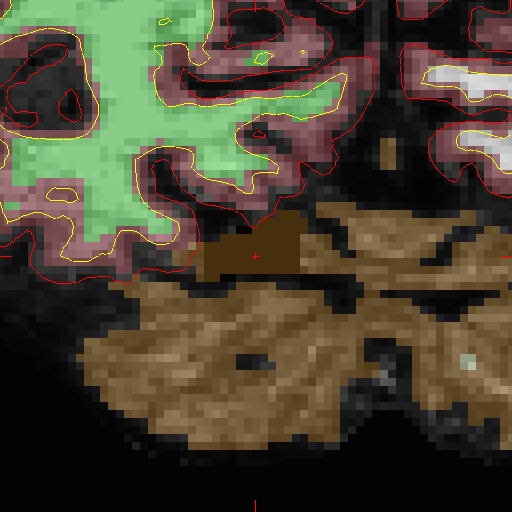
After looking at and fixing the problem in MR2, open MR1, and find the corresponding problem area (look in similar slice range):
freeview -v OAS2_0002_MR1/mri/brainmask.mgz \
            OAS2_0002_MR1/mri/brain.finalsurfs.manedit.mgz \
            OAS2_0002_MR1/mri/aseg.mgz:colormap=lut:opacity=0.25 \
         -f OAS2_0002_MR1/surf/lh.pial:edgecolor=red \
            OAS2_0002_MR1/surf/rh.pial:edgecolor=red \
            OAS2_0002_MR1/surf/lh.white:edgecolor=blue \
            OAS2_0002_MR1/surf/rh.white:edgecolor=blue
Fix the problem just as done for MR2. Compare your results to our fixed version:
freeview -v OAS2_0002_MR1_fixed/mri/brainmask.mgz \
            OAS2_0002_MR1_fixed/mri/brain.finalsurfs.manedit.mgz \
            OAS2_0002_MR1_fixed/mri/aseg.mgz:colormap=lut:opacity=0.25 \
         -f OAS2_0002_MR1_fixed/surf/lh.pial:edgecolor=red \
            OAS2_0002_MR1_fixed/surf/rh.pial:edgecolor=red \
            OAS2_0002_MR1_fixed/surf/lh.white:edgecolor=blue \
            OAS2_0002_MR1_fixed/surf/rh.white:edgecolor=blue
Next, it is time to fix the base for this subject - return to the Longitudinal Tutorial to see how.